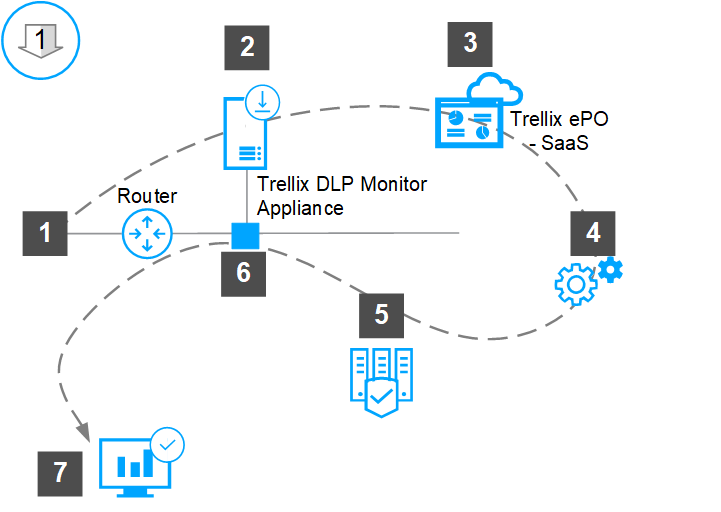
To install Trellix DLP Network Monitor – SaaS appliance software in your network for the first time, deploy and install the appliance software and provision the appliance with ePO - SaaS for managing your appliance. You can choose to install the appliance software on a physical hardware appliance or on a virtual machine.
Note
The appliance registered with ePO - SaaS is called as Trellix DLP Network Monitor – SaaS appliance.
Virtual appliances can run on your own VMware vSphere deployed on VMware vCenter Server.
You can install Trellix DLP Network Monitor – SaaS appliance software on Trellix DLP 8800, Trellix DLP 7700, or Trellix DLP 6600 appliance models.
You can install VMware vSphere deployed on VMware vCenter Server on Trellix DLP 8800, Trellix DLP 7700, or Trellix DLP 6600 appliance models.
You can make use of the Trellix DLP Network Monitor – SaaS appliance functionalities by leveraging your existing network infrastructure.
If you are using a hardware appliance, connect the appliance to your local network.
Download and extract the Trellix DLP Network Monitor – SaaS appliance software from the Trellix download site using a grant number.
Deploy and install the Trellix DLP Network Monitor – SaaS appliance software.
For the appliance to be managed, provision the appliance with ePO - SaaS from the Setup Wizard.
Integrate the appliance into your network using, for example, a SPAN port or network tap and configure the policy to work with the Trellix DLP Network Monitor – SaaS appliance.
Confirm that the appliance is connected to the network from the ePO - SaaS interface. In ePO - SaaS, navigate to Menu → Appliance Management, which shows the appliance underneath My Organization within the Lost and Found tree.
Tip
To use the Trellix DLP Network Monitor – SaaS appliance and the Trellix DLP Network Prevent – SaaS appliance on the same network, install the Trellix DLP Network Monitor – SaaS appliance first to analyze how traffic flows through your network.