Document registration scans extract signatures from files for use in defining classification criteria.
Registered documents are an extension of location-based content fingerprinting.
Note
The registered documents created by a registration scan are referred to as automatic registration. They can be viewed on the Classification → Register Documents page by selecting Type: Automatic Registration. They can be used to define Trellix DLP Network Prevent and Trellix DLP Network Monitor policies, and for defining Trellix DLP Discover scans. They can't be used in Trellix DLP Endpoint policies.
The DLP Server that performs the matching service is specified in the Policy Catalog on the Registered Documents page of the Server Configuration.
Trellix DLP Discover runs registration scans on repositories.
Each scan creates fingerprint signatures that are stored as a package on the network (by default, in the network evidence storage share).
At least one DLP Server per LAN (servers running the DLP Server software) collect the fingerprint packages.
Note
All DLP Servers collect all packages. There is no longer a requirement for synchronizing servers, thus reducing network bandwidth.
Trellix DLP Discover servers running classification or remediation scans match fingerprints with REST API calls to the DLP Server.
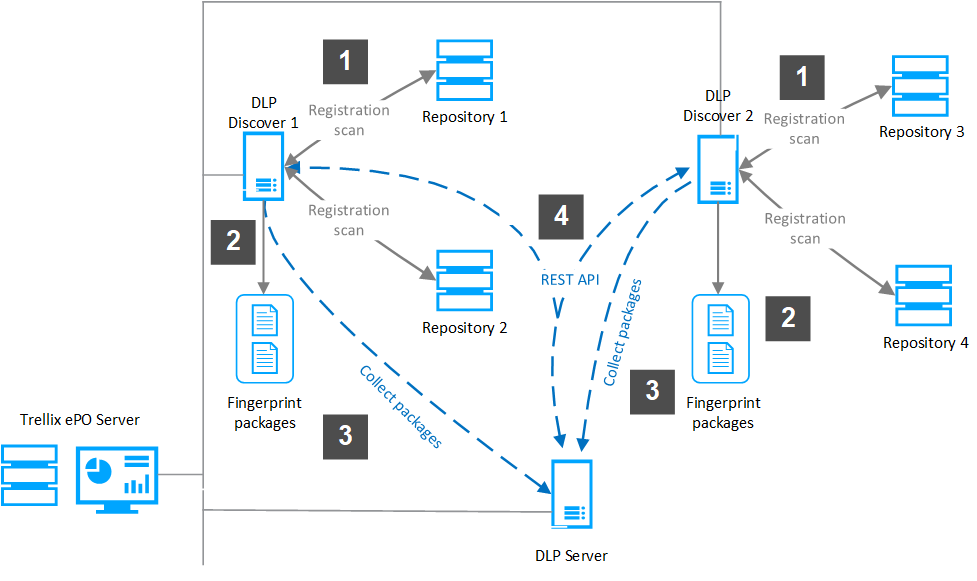
Redistribution follows these rules:
Fingerprint signature packages are stored on the network (default UNC: network evidence storage share).
All signatures are added to the DLP Server database.
Signatures are overwritten when the scan that recorded them runs again.
Limitations
Signatures can have a large RAM impact on the DLP Server. 100 million signatures, the maximum per run, takes about 7 GB of RAM.
The maximum size of the database is set in the Classification page in DLP Settings, and can range from 10 million to 500 million signatures.
The maximum number of registration scans, enabled and disabled, that can be listed in Scan Operations is 100.
The DLP Server host listed on the Policy Catalog → Server Configuration → Registered Documents page must be in the same LAN as the ePO - On-prem server. Trellix DLP Discover servers can be in another LAN or over WAN.
User credentials provided for registration scans must have, as a minimum, READ permissions and WRITE attributes, and access to the scanned folders.