You can register on-premises ePO - SaaS to apply the Trellix DLP – SaaS policies. Use the Trellix DLP Network Monitor – SaaS policies to learn about the quantity and types of data transferred across the network and to monitor network traffic. Trellix DLP Network Monitor – SaaS doesn't block or change network traffic, so you can integrate it into a production environment without impacting live traffic.
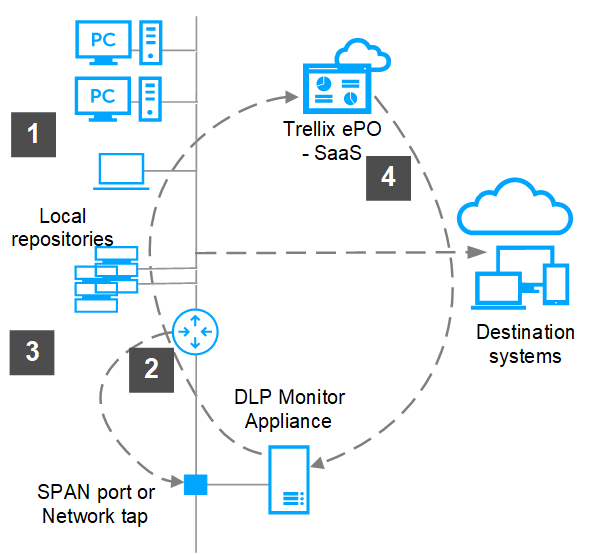
The router receives network packets from internal users and servers.
Trellix DLP Network Monitor – SaaS connects to either a Switched Port Analyzer (SPAN) port or a network tap to passively monitor live traffic received from the router.
Trellix DLP Network Monitor – SaaS receives copies of network packets and analyzes them. Sends incidents to ePO - SaaS .
ePO - SaaS sends policy to Trellix DLP Network Monitor – SaaS.
Registered documents server defines sensitive information to protect it from being distributed in unauthorized ways.
Types of protection rules
Trellix DLP Network Monitor – SaaS can apply one of these Trellix DLP – SaaS protection rules to your network traffic.
Email Protection — By default, Trellix DLP Network Monitor – SaaS inspects SMTP traffic using email protection rules, which incorporate protocol-specific information such as sender and recipient email addresses.
Web Protection — By default, Trellix DLP Network Monitor – SaaS inspects HTTP and FTP traffic using web protection rules, which incorporate protocol-specific information such as the URL.
Network Communication Protection — Trellix DLP Network Monitor – SaaS can inspect all supported traffic using network communication protection rules, which do not incorporate any protocol-specific information.
If you don't want to analyze SMTP, HTTP, or FTP traffic with email and web protection rules, you can configure Trellix DLP Network Monitor – SaaS to use network communication protection rules. To disable analysis of SMTP, HTTP, and FTP traffic, go to Menu → Policy Catalog → DLP Appliance Management → Trellix DLP Network Monitor Settings and deselect the options in the Protocol Rule Application field.
Note
Using Email Protection and Web Protection rules allows you to share rules with Trellix DLP Network Prevent – SaaS.
Supported protocols
SMTP*
IMAP*
POP3*
HTTP
LDAP
Telnet
FTP
IRC
SMB**
Trellix DLP Network Monitor – SaaS can also analyze traffic that is encapsulated in SOCKS.
* These protocols support STARTTLS (plain text initial connection converted to TLS/SSL after STARTTLS command). These protocols are treated as encrypted and does not analyze them if STARTTLS is used.
** Data transferred using SMB might be encrypted depending on the version of the protocol and your configuration.
Note
The content of encrypted connections is not analyzed directly. You can use a dedicated gateway (for example, the SSL Tap feature in Web Gateway), to intercept the encrypted connection and send the decrypted data to Trellix DLP Network Monitor – SaaS for analysis. See the documentation for your gateway for information. If Trellix DLP Network Monitor – SaaS can't classify a connection as a known protocol, it shows the connection as unknown.