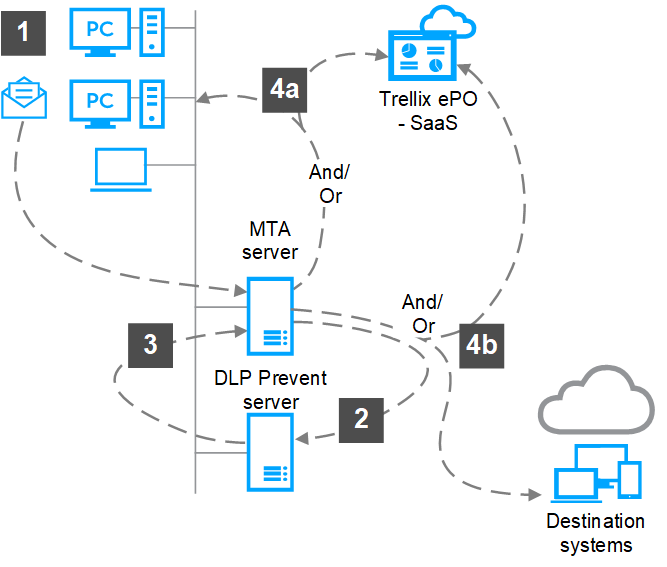
You can register on-premises Trellix DLP Network Prevent – SaaS with ePO - SaaS to apply the Trellix DLP – SaaS policies. Trellix DLP Network Prevent – SaaS integrates with any MTA that supports header inspection. It analyzes email messages and applies Trellix DLP Network Prevent – SaaS policies.
Users — Incoming or outgoing email messages go to the MTA server.
MTA server — Forwards the email messages to Trellix DLP Network Prevent – SaaS.
Trellix DLP Network Prevent – SaaS — Receives SMTP connections from the MTA server and:
Decomposes the email message into its component parts
Extracts the text for fingerprinting and rule analysis
Analyzes the email message to detect policy violations
Takes one of these actions, based on the rule that is set:
Blocks the email message and sends a notification to the Smart Host (MTA server).
Adds an X-RCIS-Action header and sends the message to the configured Smart Host (MTA server).
Adds custom headers to the delivered email message when a rule is triggered. The scanned email is relayed to the configured Smart Host (MTA server) to classify the email and take appropriate action. The custom header can report the number of rules and the cumulative score of all rules that violated a policy, or any other custom definition.
Note
In this example, the configured Smart Host is the original MTA.
MTA server — Forwards the email message to the intended recipient or returns the email message:
When the email message is blocked, Smart Host (MTA server) returns the email message to the sender as an attachment with a notification. Optionally, you can configure to send an incident to ePO - SaaS .
When an X-RCIS-Action header is added, based on the information it gets from the X-RCIS-Action header, the Smart Host (MTA server) acts on the email message. Optionally, you can configure to send an incident to ePO - SaaS .
When a custom header is configured, Trellix DLP Network Prevent – SaaS includes the defined custom header values and the basic rule reaction (X-RCIS-Action header), and relays the scanned email to the Smart Host (MTA server) to classify the email and take appropriate action.