Trellix DLP – SaaS identifies sensitive data or user activity, takes action on policy violations, and creates incidents of violations.
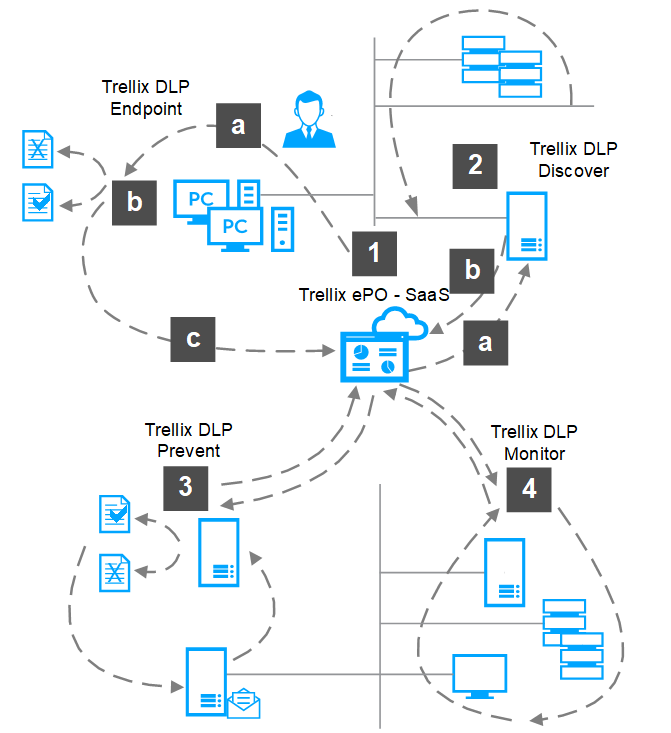
Using all supported Trellix DLP – SaaS products allows you to use the full feature set of the product suite supported on ePO - SaaS. The following diagram shows a simplified network where all Trellix DLP – SaaS products and ePO - SaaS are deployed.
Administrators create policies in ePO - SaaS and deploy them to Trellix DLP Endpoint - SaaS for Windows and Trellix DLP Endpoint – SaaS for Mac clients.
Users create, save, and copy files or emails.
Trellix DLP Endpoint - SaaS client applies policies and either blocks or allows user actions.
Applying the policies creates incidents that are sent to Trellix ePO → Protection Workspace for reporting and analysis.
Trellix DLP Discover – SaaS scans files from shared local repositories, collecting file metadata.
Trellix DLP Discover – SaaS receives classifications and policies from Trellix DLP – SaaS to apply during classification or remediation scans.
Incidents from remediation scans are sent to Trellix ePO → Protection Workspace for reporting and analysis.
Trellix DLP Network Prevent – SaaS receives email from MTA servers and web traffic from web proxy servers.
Analyzes the email messages and web traffic, applies the Trellix DLP Network Prevent – SaaS policies.
Sends incidents and evidence to Trellix ePO → Protection Workspace for reporting and analysis.
Trellix DLP Network Monitor – SaaS analyzes network traffic, then creates incidents or saves evidence for the supported protocols.
Applies network communication protection rules, web protection rules, or email protection rules.
Sends incidents and evidence to Trellix ePO → Protection Workspace for reporting and analysis.