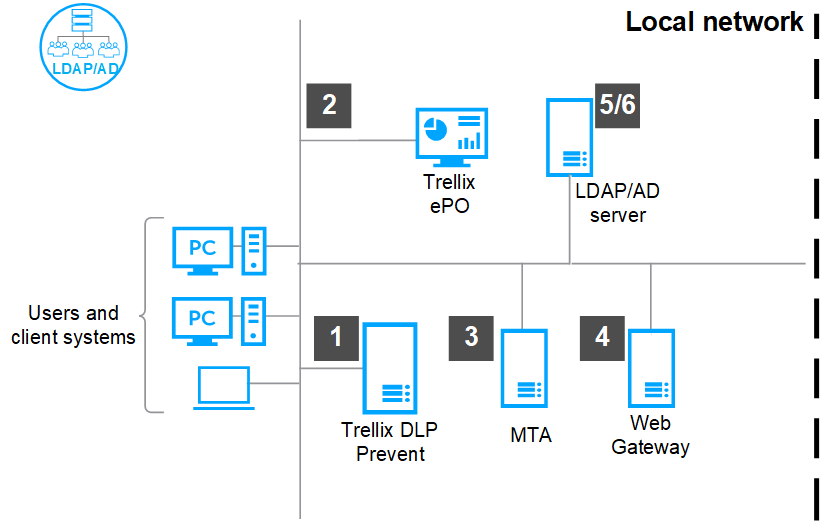
Trellix DLP Network Prevent appliance can act on email and web protection rules, which apply to specific users and groups when integrated with registered AD or LDAP servers.
Complete the installation of the Trellix DLP Network Prevent appliance software.
For the appliance to be managed, register the appliance with ePO - On-prem from the Setup Wizard.
Integrate Trellix DLP Network Prevent with the Smart Host (MTA server) that supports header inspection and configure the policy to work with Trellix DLP Network Prevent.
Integrate Trellix DLP Network Prevent with the web proxy server and configure the policy to work with Trellix DLP Network Prevent.
Choose to use the Trellix DLP Network Prevent appliance for either email analysis or scanning web traffic, but not for both. Web users experience delays (except in small environments) when you use the same appliance for both email analysis and scanning web traffic.
Retrieve the information about users and groups from the registered AD or LDAP servers using the ePO - On-prem interface.
Configure the synchronization schedule of the appliance and AD or LDAP servers.