(This topic applies to Trellix DLP - SaaS.) Your evidence files are stored using Amazon S3. Trellix DLP Discover – SaaS needs to establish a connection with an existing Amazon S3 bucket for saving or downloading these files.
A default condition for Trellix DLP Discover – SaaS is to enable evidence storage. Creating evidence storage in Amazon S3 and establishing a connection with your AWS bucket policy are the requirements, if you are enabling evidence storage in your Trellix ePO - SaaS policy.
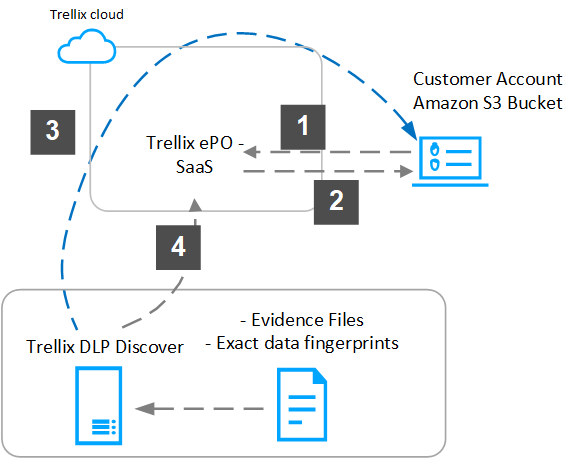
Evidence storage works as follows:
- The administrator configures the Amazon S3 bucket configurations in DLP Settings for uploading evidence files .
- After a setup connection is established, a unique AWS bucket policy is generated, which you must copy to your Amazon S3 bucket policy.
- Evidence files are uploaded from Trellix DLP Discover – SaaS to the configured Amazon S3 bucket.
- You can retrieve the evidence files generated for DLP incidents from Protection Workspace of Trellix ePO - SaaS.
Note
When you have reached your incidents quota limit, according to your license agreement, Trellix ePO - SaaS purges incidents, starting with the oldest. Evidence files associated with these deleted incidents are kept for 90 days. They are then selected for deletion and deleted after another 90 days from your Amazon S3 bucket. The 2 million incidents quota includes all Trellix DLP – SaaS incidents.