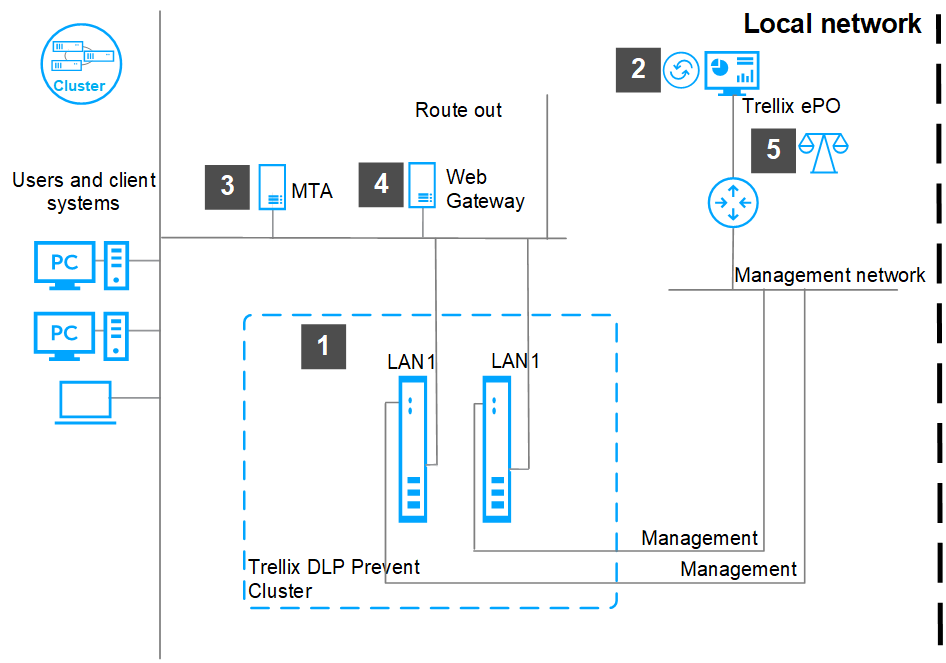
Deploy a Trellix DLP Network Prevent cluster to load balance the incoming email and web traffic, and accomplish high availability if a cluster node fails.
Tip
Run Trellix DLP Network Prevent appliances as part of a cluster.
A cluster of Trellix DLP Network Prevent appliances contains:
A Trellix DLP Network Prevent primary node (the primary appliance)
One or more Trellix DLP Network Prevent secondary nodes (cluster scanners)
The nodes listen on the same virtual IP address (VIP) and must be in the same network segment. The primary appliance is responsible for distributing email and web traffic for analysis between itself and the cluster scanners. If the primary appliance fails, any of the cluster scanners can take over the primary role. When the original primary appliance recovers, it rejoins the cluster as a cluster scanner.
Caution
You can't share cluster scanner nodes between a Trellix DLP Network Prevent cluster and a Trellix DLP Network Monitor cluster. The cluster ID and virtual IP address must be unique and different from that of the Trellix DLP Network Monitor cluster ID and virtual IP address.
Complete the installation of all appliances that you plan to include in a cluster in your network.
Note
For performance optimization, make sure that all appliances in a cluster configuration are of the same model, and all virtual appliances have the same specifications.
For the appliance to be managed, register the appliance with ePO - On-prem from the Setup Wizard.
Integrate Trellix DLP Network Prevent with the Smart Host (MTA server) that supports header inspection and configure the policy to work with Trellix DLP Network Prevent.
Integrate Trellix DLP Network Prevent with the web proxy server and configure the policy to work with Trellix DLP Network Prevent.
Choose to use the Trellix DLP Network Prevent appliance for either email analysis or scanning web traffic, but not for both. Web users experience delays (except in small environments) when you use the same appliance for both email analysis and scanning web traffic.
Enable load balancing from ePO - On-prem.