In the Riskware page of the Email Security - Server appliance, you can drill down to identify files that are detected as suspicious in emails and files that were blocked based on riskware detection, grouped by recipient, sender, or alert. The total number of riskware block alert entries that include PUP, PUA, adware, or a particular program signature are categorized and tracked on the Riskware page.
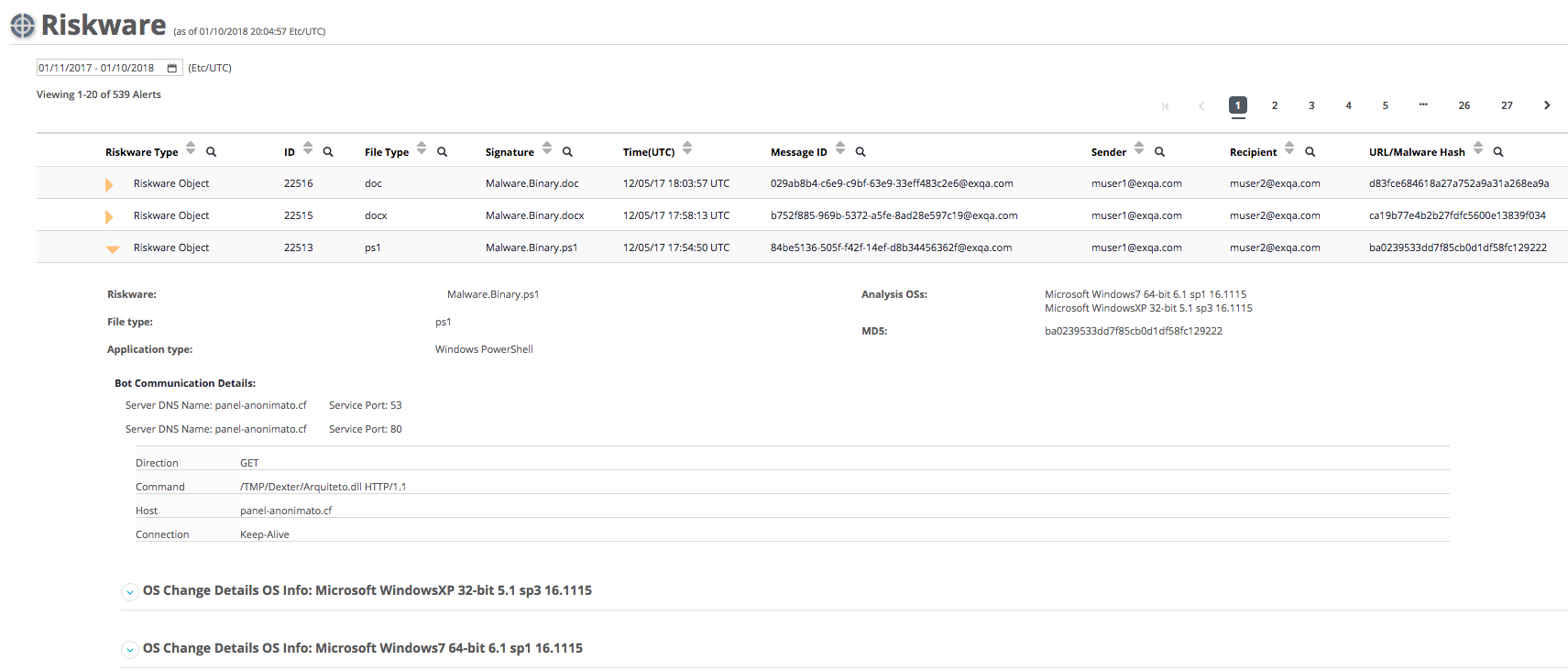
The following example displays the alert details for an alert in the event results table in the Riskware page for an email that contains a file that is detected as suspicious and generated a Riskware block alert.
To view the alert details for a particular Riskware alert, click on the golden triangle in the first column in the Riskware page.
Prerequisites
Administrator or Operator access to the Email Security - Server appliance
An established connection to the Internet
A connection to the DTI Cloud
Download and install the latest security content with new riskware policy rules by using the
fenet security-content apply-updatecommand, For details about how to update security content, refer to the System Administration Guide.Enable riskware detection. For details about how to enable riskware detection, see Enabling or disabling Trellix Riskware detection using the Web UI or Enabling or Disabling Trellix Riskware Detection Using the CLI .
Enable blocking emails based on riskware detection. For details about how to enable blocking emails based on riskware detection, see Enabling or disabling blocking emails based on riskware detected by Trellix Riskware rules using the Web UI or Enabling or disabling blocking emails based on riskware detected by Trellix Riskware rules using the CLI.