The Alerting Rules management screen allows you to create, edit, enable, disable and delete custom rules. Once rules are added, each incoming event is evaluated against all the enabled rules. If an event matches a rule, an alert is triggered and the relevant alert metadata is available from the main Endpoint Alerts page.
The module includes a handful of templates for detecting various forms of lateral movement.
Note
These templates are for reference only and should be customized for the specific environment.
The rule editor allows you to define one or more conditions for specific fields within a logon event. For example, to generate an alert any time an account from a list attempts to log into a system, one could create a rule with a single condition as shown in the figure.
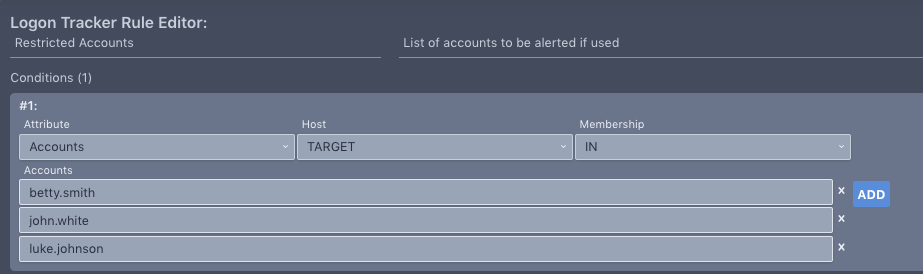 |
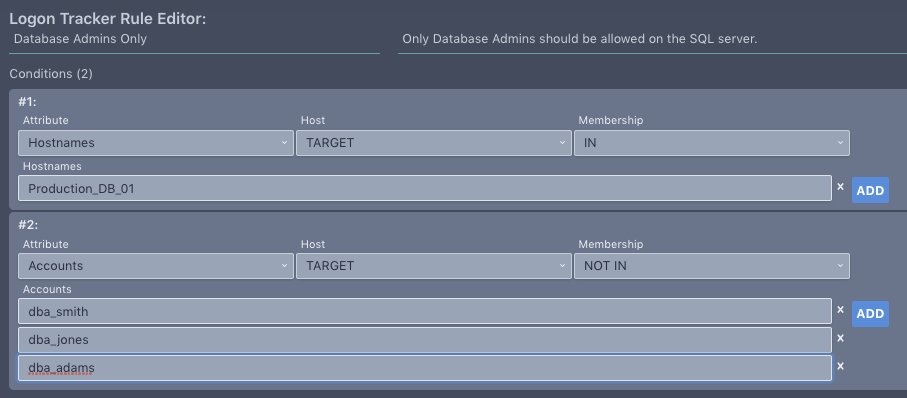
The rule above used the “IN” membership to specifically list what should trigger an alert. Conversely, a “NOT IN” membership condition can be used to alert if something is not in a list. For example, if a system should only be accessed by a list of authorized accounts, an “IN” condition combined with a “NOT IN” condition, can be used to generate an alert when logon with an unauthorized account is attempted, as shown in figure.
 |
The available event attributes for which conditions can be authored are listed below. String fields are case-insensitive and support wildcard matching with ‘*’ and single character matching with ‘?’.
Source/Target attributes: Attributes related to the source or target account or system
Accounts: Account names
Account Privileges: Privileges (unknown, privileged, unprivileged)
Hostnames: Hostnames
Networks: Networks (supports CIDR notation)
Machine Type: Machine type (server, workstation, unknown)
Domain Groups : Domain groups associated to the logon account
Local Groups: Local groups associated to the logon account
Additional event metadata: Metadata about the logon event
Logon Categories: Category of the logon event
Paths: Path to the logon executable from the event
MD5s : MD5 of the process from the event
Event IDs: Event ID from the Windows event
Logon Types: Logon Types from the Windows event
xAgent IDs: xAgent ID on which the event was observed
Logon Status: Result of the logon attempt (SUCCESSFUL, FAILED, UNKNOWN)
Tunneled: A boolean of whether we detected a tunneled connection
Type: Type of logon that occurred