The module can collect and monitor event IDs for the following events:
When an authentication package has been loaded into the Local Security Authority (EventId 4610)
A trusted logon process has been registered with the Local Security Authority (EventId 4611)
A notification package has been loaded by the Security Account Manager (EventId 4614)
A security package has been loaded by the Local Security Authority (EventId 4622)
A service was installed in the system (EventId 4697)
You must enable the Audit Security System Extension to collect and monitor these event IDs in a group policy.
Launch the local group policy editor (gpedit.msc).
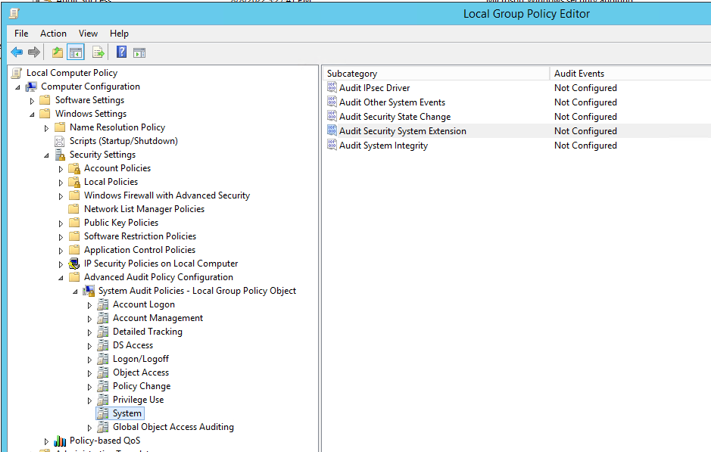
Navigate to Computer Configuration > Windows Settings > Security Settings > Advanced Audit Policy Configuration > System. Various subcategories of audit events are displayed.
Right-click Audit Security System Extension and then select Properties.
Select the Configure the following audit events, Success ,and Failure checkboxes.
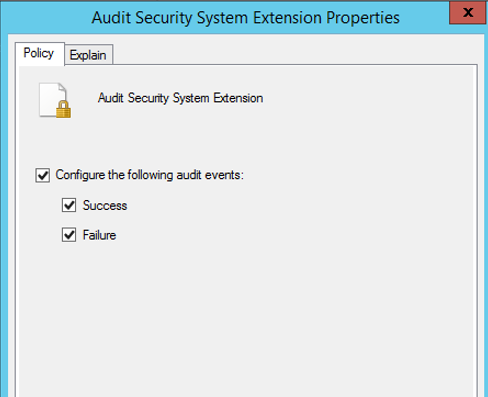
Click Apply.
For additional information see the Microsoft’s documentation here.