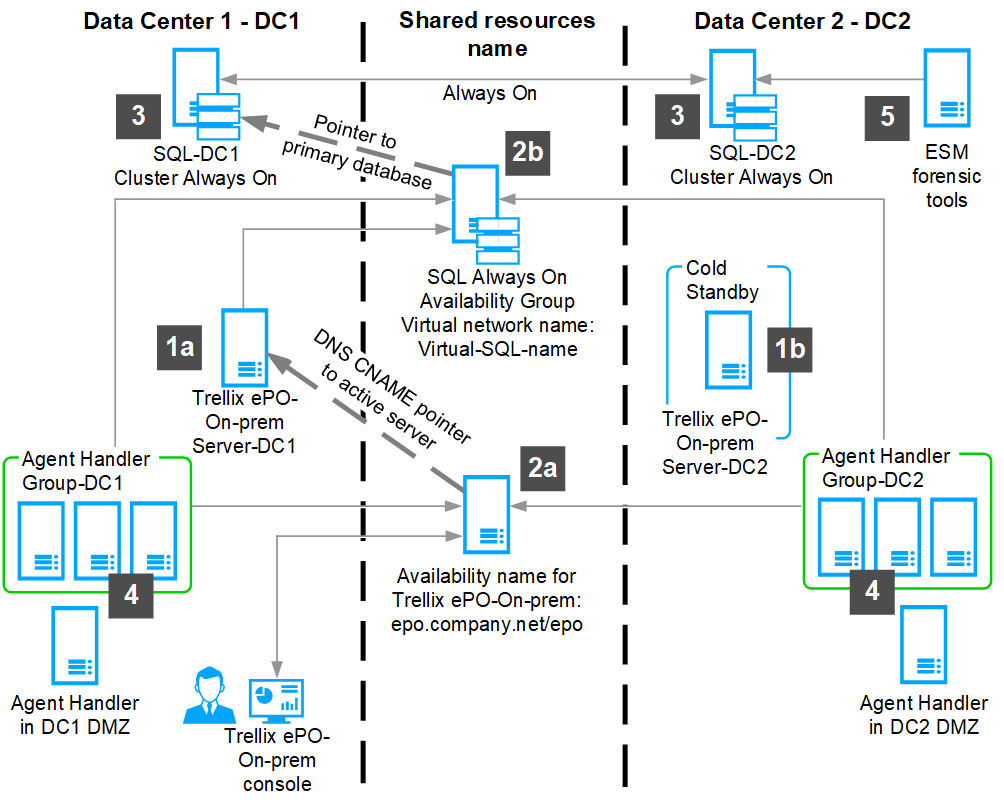
This is an example of a complex ePO - On-prem network and how it recovers after a ePO - On-prem server failure.
You must create a Snapshot of your current ePO - On-prem server before a failover occurs. Make sure the server task is finished before starting the restore process.
ePO - On-prem server
ePO - On-prem server-DC1 — This is the primary ePO - On-prem server used for day-to-day activities. The ePO - On-prem snapshots of the SQL database are completed automatically or initiated manually just after updates occur.
Note
By default, server tasks automate snapshots every night.
ePO - On-prem server-DC2 is installed and running in DC2 — This is the Cold Standby or recovery ePO - On-prem server.
Shared resources
A ePO - On-prem shared resource name configured using DNS (for example, epo.customer.net) uses CNAME to point to the active ePO - On-prem server, and is configured to point to ePO - On-prem Server-DC1 or ePO - On-prem Server-DC2.
SQL database configured with Always on Availability Groups — The SQL Server is reachable by a virtual name of SQL Availability Group. For example, Virtual-SQL-name. The Snapshots of the SQL database are completed daily and sent to the SQL databases SQL-DC1 and SQL-DC2.
SQL database servers — Use SQL replication or SQL Log Shipping to copy the ePO - On-prem database from the primary site SQL-DC1 to the secondary site's SQL Server SQL-DC2 in real time.
Agent Handlers — Agent Handler Groups and Agent Handlers in the DMZ are configured in DC1 and DC2 to use the SQL resource "Virtual-SQL-name."
Active-Passive Data Center strategy — Configure all Agent Handlers in DC2 to passive while DC1 is active, and make sure that all Agent Handlers in DC2 aren't running. This is only needed if the date center strategy for Agent Handlers is active-passive. The Agent Handler servers can be in "cold" standby and only turned on when a failover from DC1 to DC2 is initiated. If the Agent Handler servers are running, make sure the two Agent Handler services are stopped and disabled. The DC2 Agent Handlers listed in the Agent Handler Assignment still need to be listed as enabled, so the Trellix Agent is aware of their existence and starts looking for them if all DC1 Agent Handlers are unavailable.
Active-Active Data Center strategy — All services, except the ePO - On-prem server must be installed and running in both data centers. With this strategy, Agent Handlers are available and running in both data centers. You must have a good network connection between the two data centers because there's heavy traffic between the Agent Handler in one data center and the SQL Server available in the other data center.
Trellix ESM or forensic tools — These tools can use the second SQL database to relieve the active SQL Server. These tools often only require read-only access to the ePO - On-prem database, SQL-DC2, to monitor events in the database.
Name | Type | Value |
|---|---|---|
epo.customer.net | CNAME | EPO-DC1 or EPO-DC2 |
EPO-DC1 | A | 10.1.1.100 |
EPO-DC2 | A | 10.2.2.200 |