When determining the reputation of a file or certificate, Adaptive Threat Protection uses pre-execution scanning and post-execution monitoring.
Pre-execution process scanning
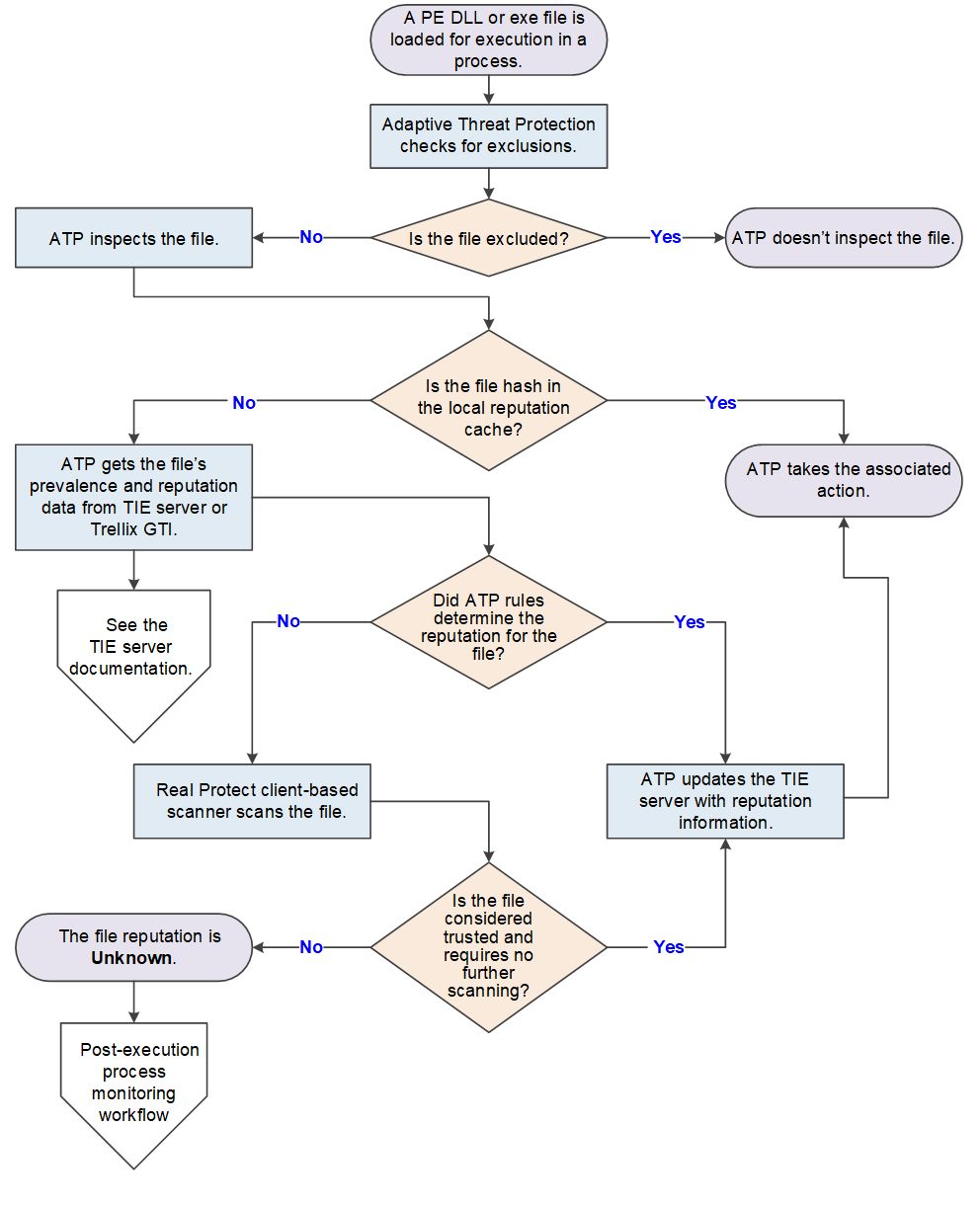
A portable executable (PE) DLL or exe file is loaded for execution in a process.
ATP checks the exclusions to determine whether to inspect the file.
ATP inspects the file and gathers file and local system properties.
ATP checks the local reputation cache for the file hash.
If the file hash is in the local reputation cache, ATP gets the file's prevalence and reputation data from the cache and takes the associated action.
If the file hash isn't in the cache, ATP gets the file's prevalence and reputation data from the TIE server or Trellix GTI.
For information, see the TIE server documentation.
If Sandbox server is present and enabled, see If sandboxing is enabled below.
Note
The Sandboxing option is available in Trellix ePO - SaaS only if TIE is licensed.
If ATP rules determine the reputation, ATP updates the TIE server with the latest reputation information and takes the associated action.
If ATP doesn't have the reputation, the ML Protect client-based scanner scans the file.
If the ML Protect client-based scanner determines the reputation, ATP updates the TIE server with the latest reputation information and takes the associated action.
If the ML Protect client-based scanner doesn't determine the reputation, the file reputation is Unknown (50). ATP might prompt the user, then allows the process to start and starts post-execution monitoring.
Post-execution process monitoring
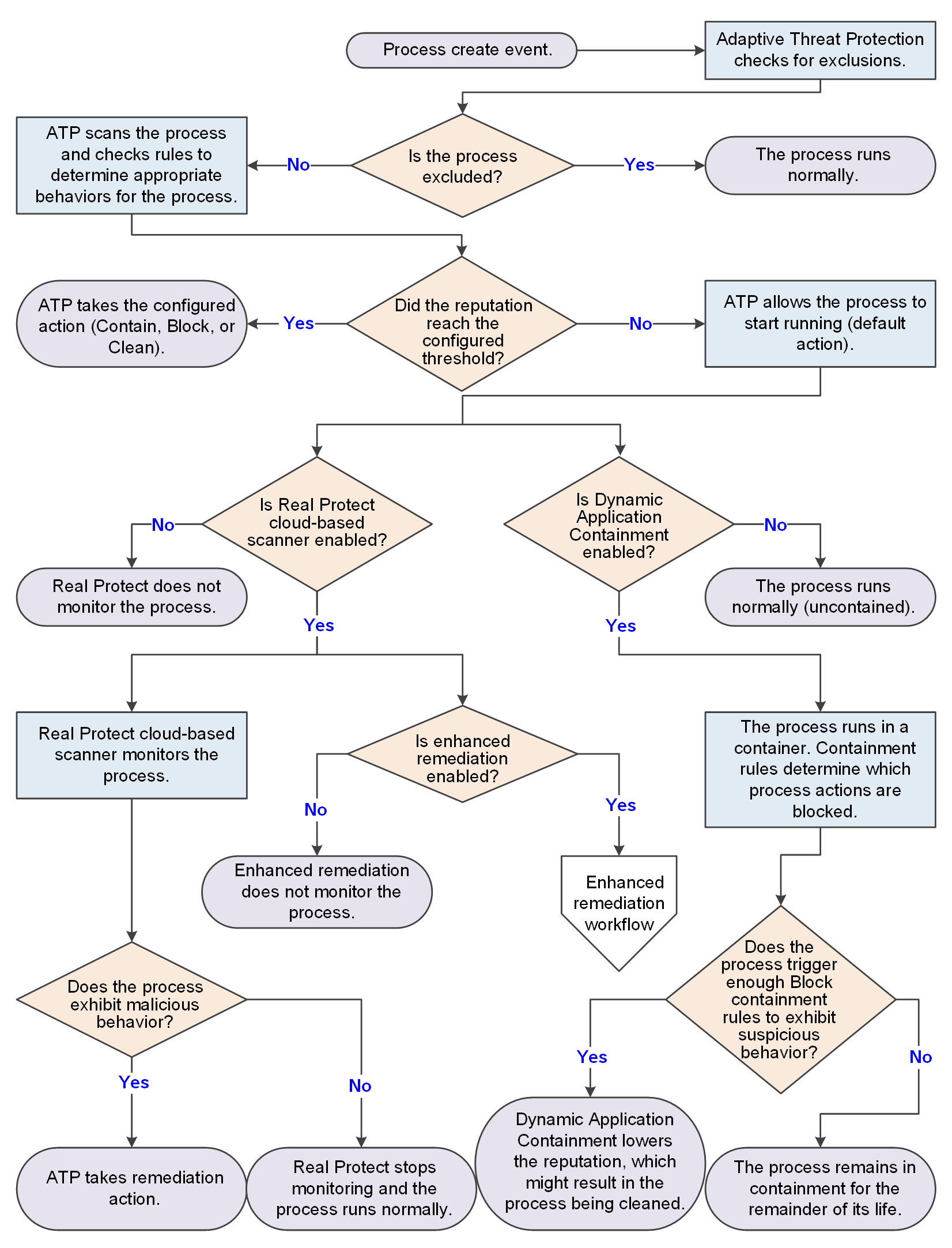
The process is created and an event sent.
ATP checks the exclusions to determine whether to scan the process.
ATP scans the process and checks the Adaptive Threat Protection rules (listed in Server Settings) for the defined appropriate behaviors for the process.
If the process reputation reaches the configured threshold, ATP takes the configured action (Contain, Block, or Clean).
If the reputation remains below the configured threshold or ATP is in Observe mode, ATP allows the process to start running, monitoring it and preventing it from performing malicious behaviors.
If enabled, the ML Protect cloud-based scanner monitors the running process.
If the process exhibits malicious behavior, ATP takes remediation action. Otherwise, ML Protect cloud-based scanner continues monitoring the process until it determines the process is not malicious.
If the reputation is Unknown and enhanced remediation is enabled, it starts monitoring the behavior of the process and backs up changes that it makes to the system. See the Enhanced remediation workflow diagram. ML Protect continues monitoring the process until it determines the process is not malicious.
If Dynamic Application Containment is enabled, the process runs in a container.
Containment rules determine the actions that the process can take. If the process triggers enough Block containment rules to exhibit suspicious behavior, Dynamic Application Containment lowers the reputation, which might result in the process being stopped and cleaned.
If sandboxing is enabled (Managed systems)
Note
The Sandboxing option is available in Trellix ePO - SaaS only if TIE is licensed.
If Sandbox server is present and enabled, the following process occurs.
If the file reputation is Unknown and the TIE server has access to Sandbox server, the TIE server sends the file to Sandbox server for scanning. Then, the TIE server keeps polling for analysis reports until they are available.
Sandbox server scans the file and sends file reputation results to the TIE server through the Trellix DXL. The server also updates the database and sends the updated reputation information to all ATP-enabled systems to immediately protect your environment. ATP or any other Trellix product can initiate this process. The TIE server processes the reputation and saves it in the database.
If Skyhigh Secure Web Gateway (SWG) for On-Prem is present (Managed systems)
If Skyhigh Secure Web Gateway (SWG) for On-Prem is present, the following occurs.
When downloading files, Skyhigh Secure Web Gateway (SWG) for On-Prem sends a report to the TIE server that saves the reputation score in the database.
When the server receives a file reputation request from the module, it returns the reputation received from Skyhigh Secure Web Gateway (SWG) for On-Prem and other reputation providers.
If Trellix Endpoint Security (ENS) Web Control is present
When you download a file, Trellix Endpoint Security (ENS) Web Control sends a message to the TIE server with the URL of the download location, the URL reputation from Trellix GTI, and the hash value of the file.
The information is available on the Associated URL tab on the hash information page.
When the TIE server receives a file reputation request, it returns this information as part of its response.