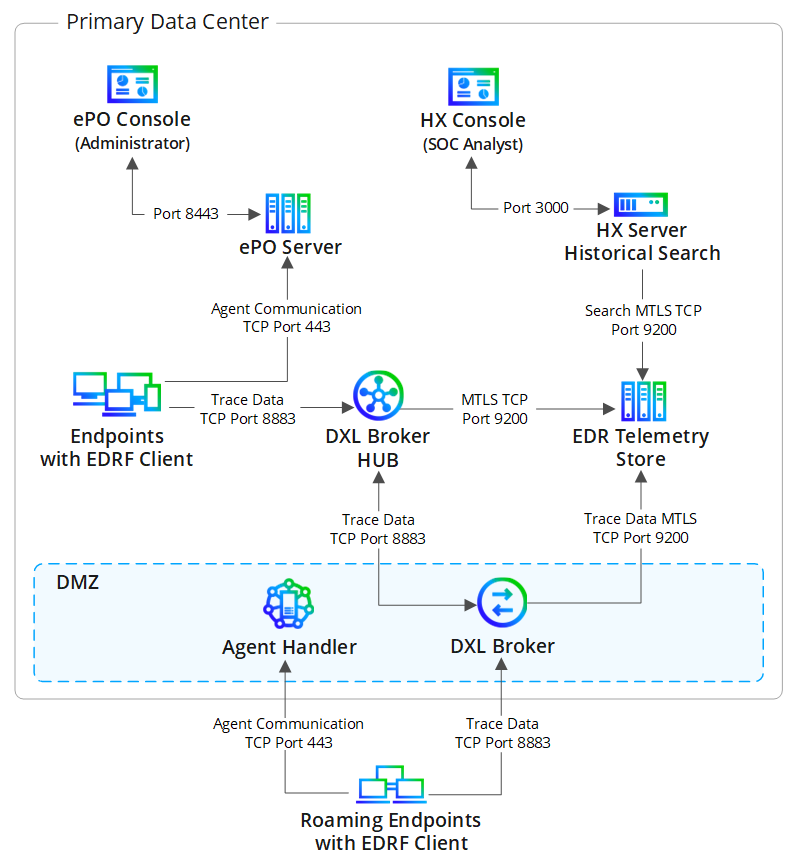
The EDRF On-prem solution processes endpoint data using three core on-premises components: the ePO server, Endpoint Security (HX) server, and the Trellix EDR Telemetry Store. Trellix Data Exchange Layer (DXL) Brokers relay trace data from managed endpoints to the centralized Trellix EDR Telemetry Store.
This solution enables you to store trace data locally and investigate endpoint activity without relying on cloud infrastructure. You must deploy the Trellix EDR Telemetry Store virtual appliance to receive, store, and index this telemetry.
Note
This high-level overview includes only the primary workflow and data flow. It does not include every server, service, or supporting component.
Telemetry generation
Managed endpoints running the EDRF Client continuously generate telemetry capturing process executions, file and registry changes, network activity, and command-line details. The endpoint transmits this telemetry to the nearest Trellix Data Exchange Layer (DXL) Broker (internal or internet-facing).
If the endpoint cannot reach a broker, it caches the telemetry and delivers it when the connection is restored.
Roaming endpoint communication
Roaming endpoints are managed devices that operate outside the internal network, such as laptops used by remote users. Since these endpoints cannot reach internal brokers directly, they communicate through the DMZ (Demilitarized Zone).
Management: Roaming endpoints communicate with the Agent Handler in the DMZ for standard management tasks.
Telemetry: Roaming endpoints send DXL trace data to the DMZ DXL Broker.
Forwarding: The DMZ DXL Broker forwards this telemetry to the DXL Broker Hub, ensuring consistent data delivery.
Note
The DMZ Agent Handler and internet-facing DXL Broker are optional components. They are required only if you need to maintain connectivity with roaming endpoints.
Extension distribution
The Trellix ePO - On-prem server registers the Trellix EDR Telemetry Store as a registered server and distributes this configuration to all connected DXL Brokers. This process installs the DXL Broker extension on each Broker, automatically configuring the connection parameters and Mutual TLS (mTLS) authentication settings required to communicate with the EDR Telemetry Store.
Note
Agents communicate with the Trellix ePO - On-prem server through the standard agent channel for policy updates and task execution.
Telemetry routing
DXL Brokers act as the transport layer for all EDRFtelemetry:
Internal DXL Brokers manage traffic from managed endpoints
Internet-facing DXL Brokers manage telemetry from roaming endpoints and relay it to internal brokers or directly to the EDR Telemetry Store.
Data preparation and indexing
When telemetry reaches the EDR Telemetry Store, it triggers ingestion through the data preparation pipeline. The system parses, normalizes, and indexes the data into the OpenSearch database, making it immediately searchable for investigation.
Historical search and analysis
The Endpoint Security (HX) server connects to the EDR Telemetry Store to query the indexed data. SOC Analysts access the Historical Search interface through the Endpoint Security (HX) Console to retrieve, filter, and analyze endpoint activity across the entire historical dataset for scoping, investigations, and threat hunting. to analyze telemetry, investigate threats, and identify suspicious network activity.
Management and policy
ePO controls endpoint communication and policy enforcement.
The ePO server manages configuration updates on Agent Communication Port 443.
Administrators use the ePO console to configure deployments and manage policy settings across all endpoints.