Threat Prevention has two components: an extension installed on the Trellix ePO - On-prem server and the protection software itself, including the scan engine and content files, installed on the client system. Threat Prevention includes the protection software itself and the scan engine and content files installed on the client system.
Also installed on the client system is Trellix Endpoint Security (ENS) Common, which includes the Trellix Endpoint Security (ENS) Client.
Using Trellix Agent, the client software communicates with Trellix ePO - On-prem for configuration and reporting, Trellix Global Threat Intelligence for reputation information, and Trellix Advanced Research Center for content file and engine updates.
Using Trellix Agent, the client software communicates with Trellix Global Threat Intelligence for reputation information and Trellix Advanced Research Center for content file and engine updates.
Workflow example — Access Protection
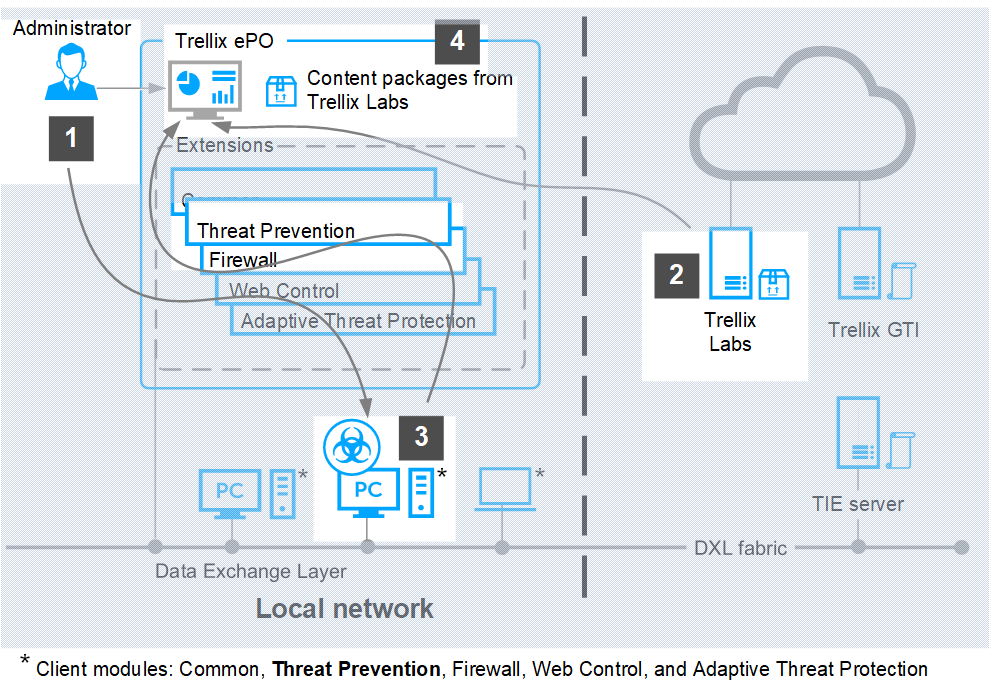
Threat Prevention follows this basic process to protect files, registry keys, registry values, processes, and services.
If managed, the administrator configures protection rules in the Access Protection policy and enforces it to the client system.
The administrator configures protection rules in the Access Protection policy in Trellix ePO - On-prem and enforces it to the client system.
The administrator downloads the latest content files from Trellix Advanced Research Center.
A user downloads a legitimate program (not malware), MyProgram.exe, from the Internet and runs the program.
MyProgram.exe starts and also starts a child process called AnnoyMe.exe. AnnoyMe.exe tries to change the operating system to make sure that AnnoyMe.exe always loads on startup.
Threat Prevention processes the request and matches the action against an existing Trellix-defined or user-defined protection rule. Threat Prevention prevents AnnoyMe.exe from changing the operating system.
Threat Prevention logs the details. Threat Prevention logs the details, then generates and sends an event to Trellix ePO - On-prem.
Client system
In addition to Threat Prevention, the client system includes:
Content files (including AMCore content, also called malware signatures, Access Protection, and Exploit Prevention content) — Works with the scan engine to identify and handle threats.
Note
Exploit Prevention is not supported in the ARM architecture.
Scan engine — Scans the files, folders, and disks on the client system and compares the results to the known virus information in the content files.
Trellix Agent — Provides secure communication between managed products and the Trellix ePO - On-prem server.
Trellix Endpoint Security (ENS) Common — Provides services, such as updating, logging, reporting events and properties, task scheduling, communication, and storing settings.
Trellix ePO - On-prem
The Trellix ePO - On-prem server uses these components to manage and update client systems remotely:
Trellix ePO - On-prem — Manages and enforces Threat Prevention policies from a central location and provides queries and dashboards to track activity and detections.
Content repository — Retrieves the content updates from the Trellix download site. Using a content repository in your organization, you can copy content files automatically and minimize bandwidth.
Trellix server
Trellix, home to Trellix Advanced Research Center and Trellix support, provides the following services.
Trellix Advanced Research Center (Threat Library) — Researches and stores detailed information about malware and potentially unwanted programs, including how to handle them.
Trellix GTI (heuristic network check for suspicious files) — Looks for suspicious programs and DLLs running on client systems that Threat Prevention protects. The Trellix GTI feature sends the fingerprint of each suspicious file to Trellix Advanced Research Center for analysis and response.
Content and engine updates — Provides protection against specific vulnerabilities and blocks emerging threats (including buffer-overflow attacks) from executing.