Threat Intelligence Exchange uses network protocols and ports to allow communication with its environment.
Skyhigh Secure Web Gateway server and Trellix Intelligent Sandbox communicate with the TIE server through Trellix DXL.
Make sure that these ports are open and available for use with Threat Intelligence Exchange.
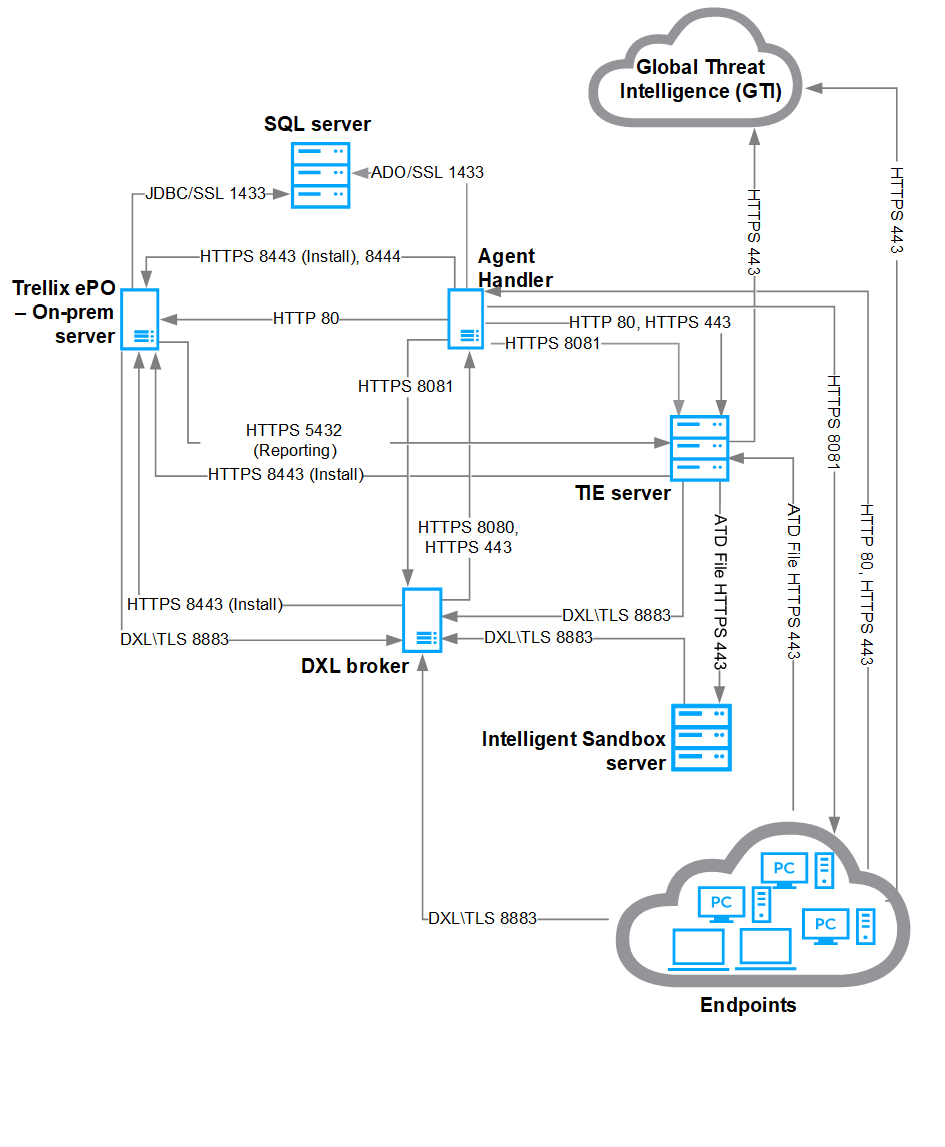
This table describes the endpoints, network protocols, and ports of the diagram, from top to bottom, left to right.
Default port | Protocol | Description |
|---|---|---|
22 | TCP (SSH) | SSH console to Trellix DXL/TIE appliances. |
53 | UDP/TCP | Required for Trellix GTI lookups. If DNS server isn't available, or the current DNS doesn't resolve public URLs, it should resolve to tie.repl.gti.trellix.com and tieserver.rest.gti.trellix.com |
80 | TCP | See Trellix Agent KB66797. |
80 | TCP | File upload from the TIE client to the TIE server for Intelligent Sandbox analysis. |
123 | UDP | Network time synchronization. |
443 | TCP | Secure file upload from the TIE client to the TIE server for Intelligent Sandbox analysis. Required for TIE server 2.3.0 or later. |
5432 | TCP | Trellix ePO - On-prem connectivity applicable to the TIE server used for the Trellix ePO - On-prem reporting function only. Monitoring and replication traffic sent from secondary TIE servers to primary TIE servers. |
8081 | TCP | See Trellix Agent KB66797. |
8443 | TCP | Required only during the TIE server installation to configure the Trellix Agent (outbound). |
8883 | TCP | Trellix DXL messaging. |
Important
These are the default ports used with TIE server. The list varies if you customize the ports.
For details about the default ports required for each component, see KB66797.