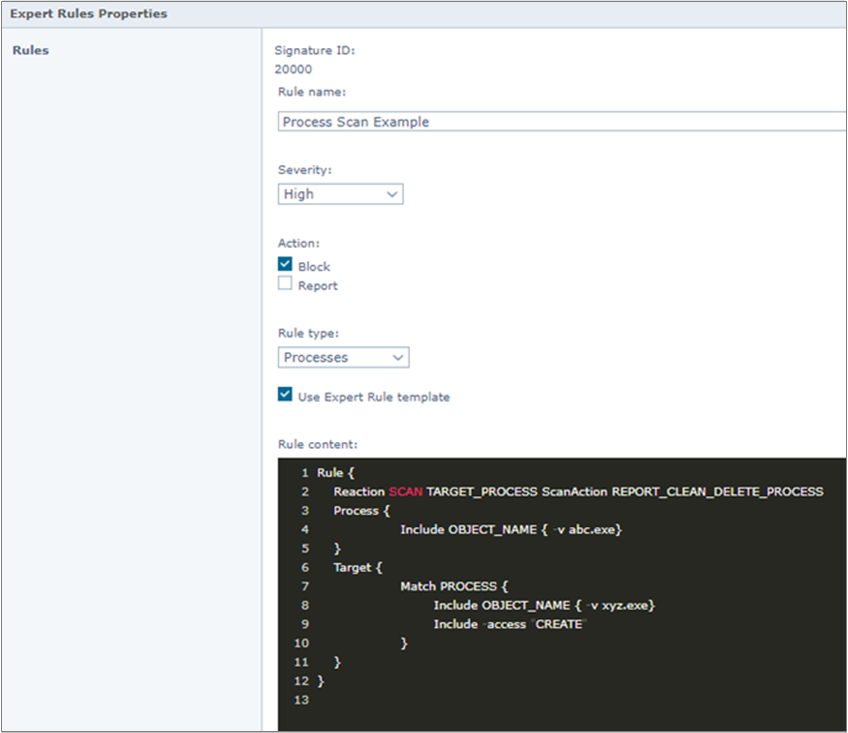
The Reaction SCAN command defines the ability to perform process scans when a rule matches.
Note
Exploit Prevention is not supported in the ARM architecture.
Description
Note
The Reaction SCAN command is available with Endpoint Security 10.7 November 2020 Update and later.
This command takes two arguments:
Process to be scanned (ACTOR_PROCESS and/or TARGET_PROCESS).
ScanAction, the action to take when a detection occurs.
Syntax
An example of a rule with the Reaction SCAN command. The command precedes the Process clause in this example of a simple Expert Rule where the Reaction SCAN command is used.
Rule {
Reaction SCAN ACTOR_PROCESS ScanAction REPORT_CLEAN_DELETE_PROCESS
Reaction SCAN TARGET_PROCESS ScanAction REPORT_CLEAN_DELETE_PROCESS
Process {
Include OBJECT_NAME { -v abc.exe}
}
Target {
Match PROCESS {
Include OBJECT_NAME { -v xyz.exe}
Include -access "CREATE"
}
}
}
The Reaction SCAN command can also be used in chained Expert Rules. The command is placed at the top of the Next_Process_Behavior clause.
Rule {
Reaction SCAN ACTOR_PROCESS ScanAction REPORT
Process {
Include OBJECT_NAME { -v abc.exe }
}
Target {
Match PROCESS {
Include OBJECT_NAME { -v xyz.exe }
Include -access "CREATE"
}
Next_Process_Behavior {
Reaction SCAN TARGET_PROCESS ScanAction REPORT
Target {
Match PROCESS {
Include OBJECT_NAME { -v rmg.exe }
Include -access "CREATE"
}
}
}
}
}
Example
Reaction SCAN ACTOR_PROCESS ScanAction REPORT_CLEAN_DELETE_PROCESS
When the Expert Rule matches, the actor process is scanned with a scan action that tries to clean the process. If the clean action is not successful, it attempts to delete the process and will log the detection to On-Demand Scan Activity log and report the detection to Trellix ePO - On-prem.
Reaction SCAN TARGET_PROCESS ScanAction REPORT
When the Expert Rule matches, the target process is scanned with a scan action that will log the detection to On-Demand Scan Activity log and report the detection to Trellix ePO - On-prem.
For more detailed examples on how to use Reaction SCAN, see Expert rule triggered process scan.
Note
The process scan only works on processes, it does not work on files and registry. The process scan takes around 2 seconds to complete; on a detection the complete scan takes between 2–9 seconds to fix it.
Scan actions
These are the scan actions and their descriptions.
Scan action | Description |
|---|---|
CLEAN_PROCESS | Attempts to clean the process. The detection is logged to the On-Demand Scan Activity log. |
DELETE_PROCESS | Attempts to delete the process. The detection is logged to the On-Demand Scan Activity log. |
CLEAN_DELETE_PROCESS | First attempts to clean the process, if unsuccessful then attempt to delete the process. The detection is logged to the On-Demand Scan Activity log. |
REPORT | No action is taken on the detected process. The detection is logged to the On-Demand Scan Activity log and a detection event is sent to Trellix ePO - On-prem. |
REPORT_CLEAN_PROCESS | Attempts to clean the process. The detection is logged to the On-Demand Scan Activity log and a detection event is sent to Trellix ePO - On-prem. |
REPORT_DELETE_PROCESS | Attempts to delete the process. The detection is logged to the On-Demand Scan Activity log and a detection event is sent to Trellix ePO - On-prem. |
REPORT_CLEAN_DELETE_PROCESS | First attempts to clean the process, if unsuccessful then attempt to delete the process. The detection is logged to the On-Demand Scan Activity log and a detection event is sent toTrellix ePO - On-prem. |
If multiple Reaction SCAN commands are included in an Expert Rule, each command can have a different scan action.
Task-less process scan
When the Expert Rule matches, a process scan request is sent asynchronously to On-Demand Scan. The On-Demand Scan performs the process scan as a Task-less On-Demand Scan. This scan happens immediately and does not depend on the scheduled scan task.
Events and log details
Detection logging
If a detection occurs, the detection is logged in the On-Demand Scan Activity log. The detection information in the log includes the rule ID, rule name which triggered the scan, the name of the detected process, and the scan action (remediation action) taken.
Trellix ePO - On-prem events
If one of the report scan actions (REPORT, REPORT_CLEAN_PROCESS, REPORT_DELETE_PROCESS, REPORT_CLEAN_DELETE_PROCESS REPORT) is used, a detection event is sent to Trellix ePO - On-prem. The detection event follows the same format as of On-Demand Scan process scan detection events except for the fields Task Name, Analyzer Rule ID, and Analyzer Rule Name.
These fields are named in these format:
Expert Rule On-Demand Process Scan
Expert Rule ID
Expert Rule Name
Scanned or not scanned log details
Each scan is logged to the On-Demand Scan Debug log. If a scan does not occur for some reason, the rule ID, rule name, process name, and the reason why the scan could not be completed is logged in the On-Demand Scan Activity log.
Debug logging
The complete flow of an Expert Rule triggering a process scan can be seen by enabling debug logging for Exploit Prevention and On-Demand Scan. The Expert Rule sending the scan request is seen in the Exploit Prevention Debug log, and the handling of the process scan is seen in On-Demand Scan Debug log.
Special consideration
The process scan is not able to scan Windows protected process because it can't get access to the process memory. The inability to scan a process due to this is logged in the On-Demand Activity log, citing that the process scan is unable to access the process for scanning.
It is possible to create Expert Rules which match thousands of times a second, and if the Expert Rule includes the Reaction SCAN command then, if unchecked, could request a process scan thousands of times a second. Therefore safeguards are in place that will limit one process scan, per process at a time.
Expert Rule action can be executed to block and report. In the given example, the Expert Rule is configured to block creating xyz.exe and it also has a reaction to scan the target process, xyz.exe. In this case, the process scan does not occur because the process launch is blocked. The attempt to perform process scan on xyz.exe fails because the scanner is not able to access the xyz.exe process.