In addition to streaming data to Helix, the module can send data to other configured servers using the Syslog protocol. When a syslog server is added to the module, each server is given a priority. The module attempts to send the data to server with the highest priority first. If the module cannot connect to the highest priority server, the server with the next highest priority is tried. This process continues until the module successfully sends the data or an attempt is made to connect to all servers.
To add a syslog server to send data to:
Open the Event Streamer module policy configuration page.
Select the Syslog Settings tab.
Click the ADD SYSLOG SERVER button. The Add Syslog Server dialog box appears.
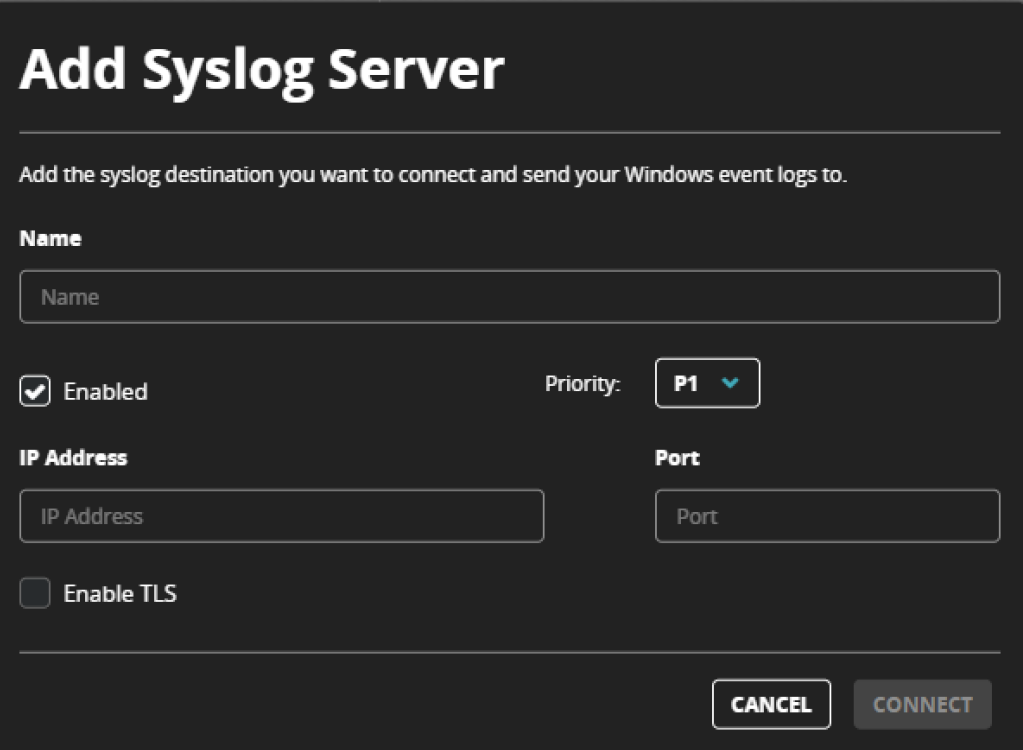
Enter the following details to add a syslog server for Event Streamercommunication:
Name: The name used for display.
IP Address: The IP v4 address or the fully qualified domain name (FQDN) of the destination server.
Port: The port to connect to the server.
Enable TLS: When enabled Event Streamer will establish a secure connection using TLS when connecting to the server.
Priority: The priority of the server. This is only important if multiple servers are being configured. P1 is the highest priority and this server will always be tried first when the module sends data. If multiple servers have the same priority, They will be tried at random.
Click Connect.