You can enable or disable some options on the server settings for performance enhancements.
For example, if you are not using Trellix GTI or TIE in your environment then you can disable these features for increased performance.
Catalog cert extraction
Microsoft Windows binaries can be catalog signed or have an embedded signature. TACC uses custom code to extract embedded certificates. The certificates can be extracted in kernel space or user-space. Extraction of embedded certificates is the only type of signing supported with TACC until the 7.0.x release.
TACC 7.0.x supports reputation-based execution, this allows, or blocks a file by the reputation of its certificate. Because several files in Microsoft Windows are catalog signed, this feature requires extraction of catalog signatures. TACC uses the APIs provided by Microsoft to extract the catalog certificates for binaries. It extracts the certificate initially and stores them in its inventory and does not connect with the APIs every time a request is made. This saves time and improves system performance. It extracts catalog certificates only when software upgrades, changes in files, or to merge inventories.
If all reputation is disabled, there is no need to extract the catalog certificates during these events.
Run the command to disable the catalog certificate extraction:
Sadmin config set CatalogCertExtractionDisabled=1
Note
Reboot is not needed.
Avoid volume name extraction
During solidification, volume names are extracted for every file. This is an expensive process. The idea here is to maintain a small cache of volume names.
If two files (for example, A:\a\b\c\d\f1.txt and A:\a\b\c\d\f2.txt) have the same volume name, it can be used to avoid volume name extraction. You must see a significant reduction in solidification time and enable task time with this one.
Run the command to reduce solidification time:
Sadmin config set AvoidVolumeNameExtractionWherePossible=1
Note
Reboot is not needed.
Embedded cert extraction
This is similar to Catalog cert extraction. The only difference is that it is for Embedded certificates. Caveats are the same, if reputation is enabled, this must not be disabled.
Note
Auth-by-cert and cert-as-updater rules don't depend on certificate extraction in the user-space, and those still work with this configuration.
Run the command to disable the embedded certificate extraction:
Sadmin config set EmbeddedCertExtractionDisabled=1
Note
Reboot is not needed.
IsInvbackup
This feature is enabled by default and creates a backup copy of the local allow list. This backup copy is created during the boot sequence, which increases system boot time and cause performance issue. If the allow list is corrupted, TACC can recover it from a backup copy rather than resolidify the system.
Run the command to create a backup copy of the local allow list:
Sadmin config set IsInvbackupEnabled=0
Note
Reboot is not needed.
Reputation-based tracking
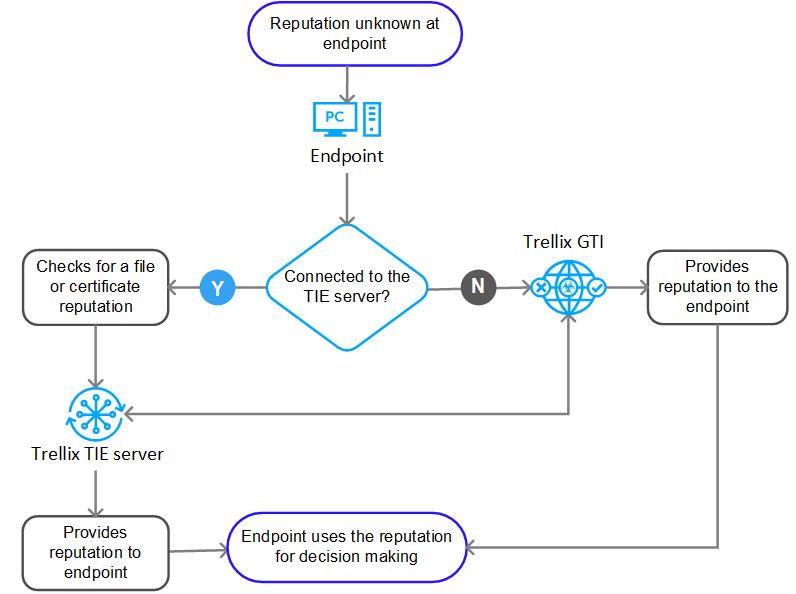
If you are using reputation-based tracking, and your clients can't connect directly to the Trellix GTI server then you could have performance issues on your system. For information about how to resolve the issue, see KB86638.
If you use a proxy for clients to connect to the internet, you either need to use TIE for reputation or allow your clients to directly connect to Trellix GTI servers. For more information about Trellix GTI or TIE configuration, see product documentation of Trellix GTI and TIE.
After you install TACC, you should exclude its processes and folders from being scanned by Trellix ENS or Threat Prevention scanning engine. Scanning TACC processes and folders consumes time and impacts system performance. Make sure you have exclusions in your antivirus software. For more information, see KB88915.
Create an on-access scanner low-risk process exclusion (Disable scanning when writing to or reading from disk) for the Trellix Application and Change Control process Scsrvc.exe.
Note
The default location for TACC process is C:\Program Files\McAfee\Solidcore. Create an exclusion for the TACC folder <drive>\Solidcore\.
If you use a third-party antivirus or Endpoint Protection software, use the same exclusions in the third-party program.
Example: Windows defender
[HKEY_LOCAL_MACHINE\SOFTWARE\Microsoft\Windows Defender\Exclusions\Paths]
"C:\\Solidcore"=dword:00000000
"C:\\Program Files\\McAfee\\Solidcore"=dword:00000000
[HKEY_LOCAL_MACHINE\SOFTWARE\Microsoft\Windows Defender\Exclusions\Processes]
"scsrvc.exe"=dword:00000000
"swin.sys"=dword:00000000