Installing ePO - On-prem on a GCP allows you to resize your server as your network grows, eliminating the chance of hardware failure.
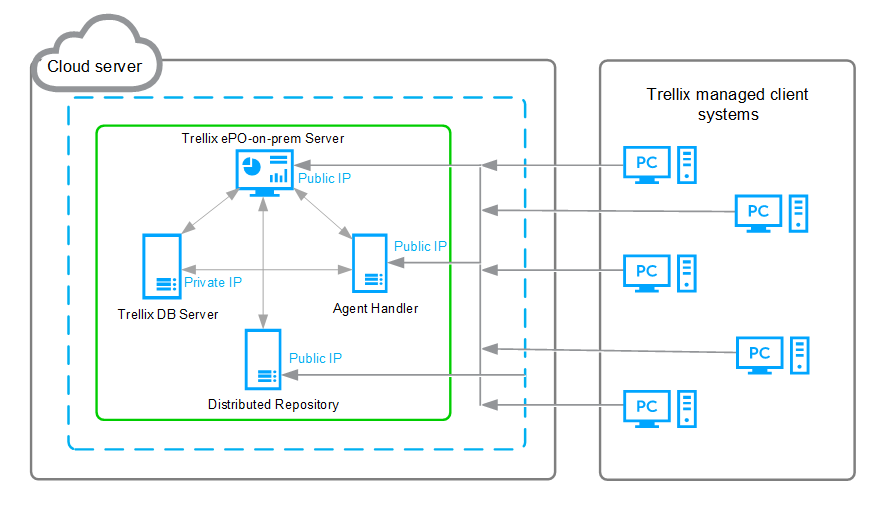
A GCP virtual server provides the same features and performance as locally configured hardware. This diagram shows the basic configuration of ePO - On-prem installed on a GCP server.
Limitations
There are some limitations that you need to consider when a server initiated communication is needed.
If the ePO - On-prem server or the Agent Handler can't communicate with the Agents in a private network, then these features don't work.
Push agent doesn't work — Use a VPN to overcome this limitation.
Wake up agent using Agent Handler doesn't work — Use a VPN or configure DXL to overcome this limitation.
Run client task using an Agent Handler doesn't work — Use a VPN or configure DXL to overcome this limitation.
If the ePO - On-prem server or the Agent Handler can't communicate with remote servers in private networks, then these features don't work.
Distributed repositories such as SuperAgent, FTP, HTTP, and UNC doesn't work.
Registered server that can't communicate with the ePO - On-prem server doesn't work.
If ePO - On-prem can't reach the SMTP server, the email service doesn't work.
Note
If ePO - On-prem can communicate with agents and remote servers, then these features work as expected; provided the needed ports are configured in Firewall.