Without Agent Handlers, any Trellix Agent behind a DMZ, firewall, or in a NAT network can be viewed with the ePO - On-prem server. But you can't manage or directly manipulate those systems in the NAT network.
With an Agent Handler behind the DMZ, you can address systems within the NAT region for wake-up calls, data channel access, and more.
Note
This Agent Handler connection requires access to both the SQL database and the ePO - On-prem server. Some firewall rules are necessary for this configuration.
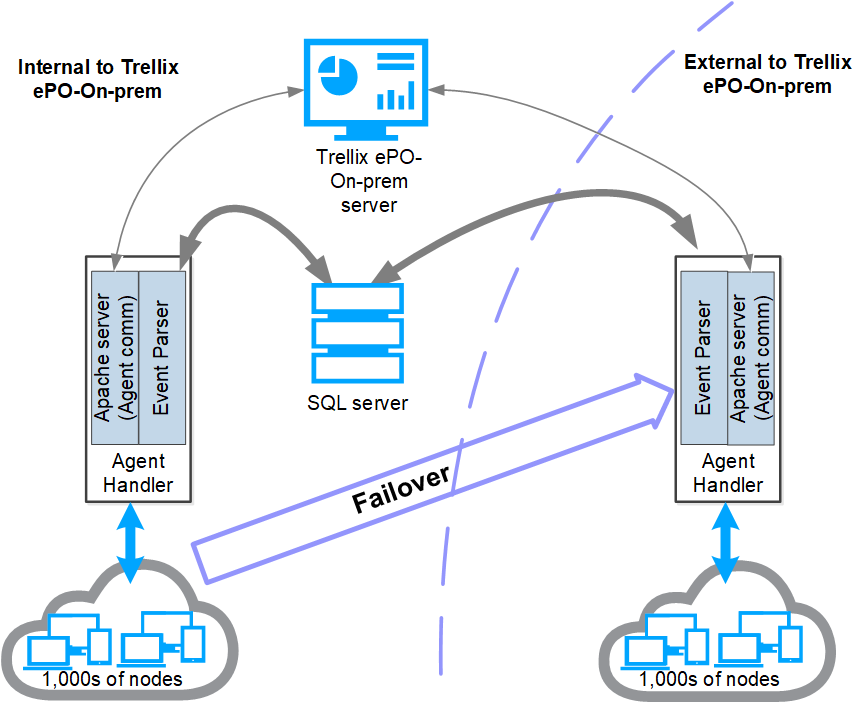
This diagram shows an Agent Handler with managed systems behind the DMZ and these connections:
Data Channel connection to the ePO - On-prem server
Low-latency high-speed connection to the SQL database
Failover connection between the Agent Handlers
This table lists all ports used by the ePO - On-prem server and the other network components.
Important
The ports connecting the Agent Handler to the ePO - On-prem server and SQL database must be open to connect to the Agent Handler through a firewall.
Server | Direction | Connection | Port |
|---|---|---|---|
ePO - On-prem | To | Web browser | HTTPS 8443 |
ePO - On-prem | To | SQL database | JDBC/SSL 1433 |
Agent Handler | From | ePO - On-prem | HTTPS 8443 (install), HTTPS 8444 |
Agent Handler | Both | ePO - On-prem | HTTP 80 |
Agent Handler | To | SQL database | ADO/SSL 1433 |
Agent Handler | To | Clients | HTTP 8081 |
Agent Handler | From | Clients | HTTP 80, HTTPS 443 |