You can configure interpreters to control the execution of additional scripts.
Unlike executables, a script needs an interpreter to read and execute the instructions written in a scripting language. To manage execution of scripts in your setup:
Check that relevant interpreters and scripts are allowed.
Map appropriate file extensions of scripts with specific interpreters.
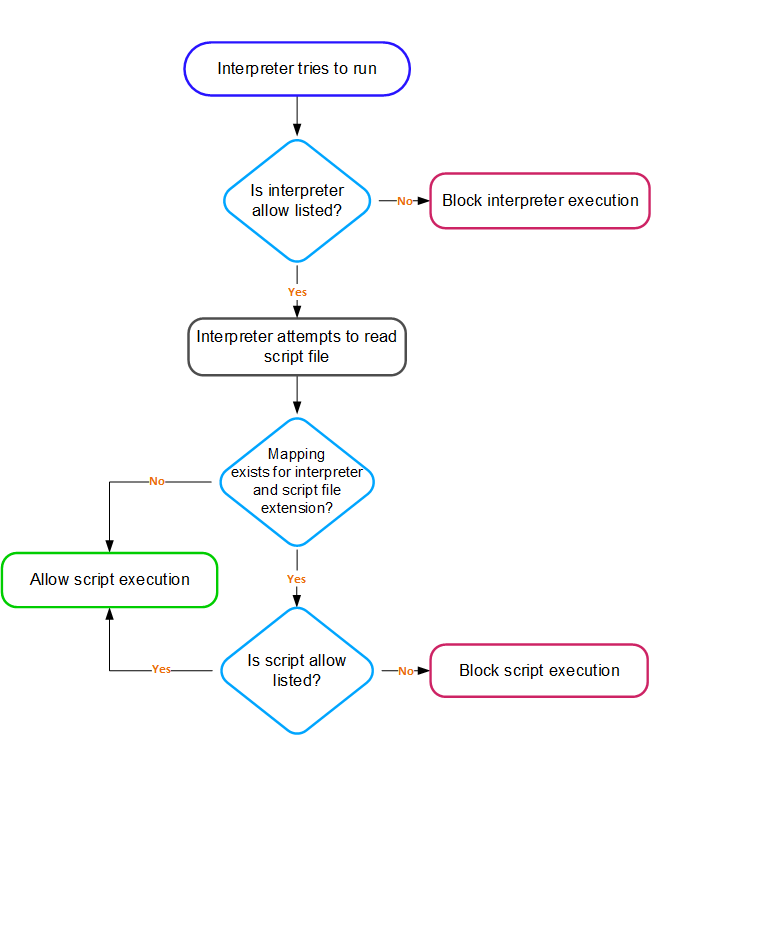
On the Windows platform, by default, if no interpreter is associated with a script file, the script is allowed to execute because Application Control doesn't treat it as a script file. By default, the software supports standard interpreters and script files that are integrated with Windows operating system, such as batch files (.bat), command interpreter (.cmd), script files (.vbs), PowerShell files (.ps1), and Command files (.com).
When you execute an interpreter to run a script file, these checks that are performed.