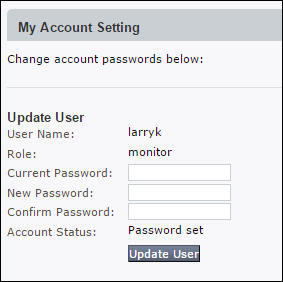
To change your own password, use the My Account Setting page.
Users with the Admin role do not have access to this page. Users with the Admin role manage their own accounts using the User Account Settings page instead.
Note
This procedure does not apply to VX Series appliances, which do not have a Web UI.
To change your own non-Admin password:
Go to the Settings > My Account page or, for an HX Series appliance, the Admin > Appliance Settings > My Account page.
Enter your current password in the Current Password box (if present).
Enter your new password in the New Password box.
Enter your new password again in the Confirm Password box.
Network Security (NX) > Common Security Platform Product Docs > System Security Guide Release 2026.1 > Authentication > Local authentication > Managing your own account