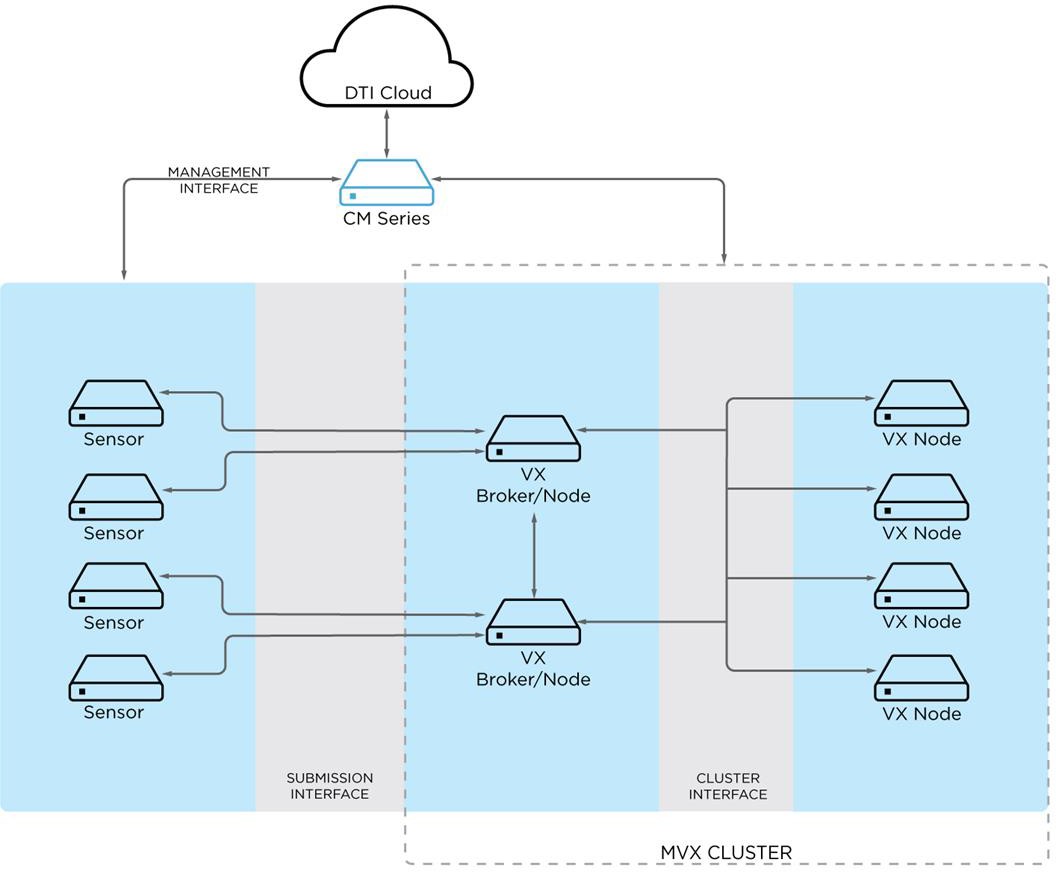
The following diagram shows the communication paths between the IVX cluster components.
During the initial configuration, you can accept the default interfaces provided by the configuration wizard, or you can change them.
Management Interface—In the preceding diagrams, the enrolled sensors and the brokers and nodes are connected to the same Central Management appliance. The connection is established through the management interface the same way as it is for other managed appliances. By default, both SSH and HTTPS traffic use the SSH port (port 22).
Note
Alternatively, the sensors can be connected to another Central Management appliance or can be standalone appliances.
Submission Interface—Sensors and brokers communicate with each other through the submission interface using SSH. The default submission interface is ether1. A second interface (ether2) can also be configured.
Cluster Interface—Brokers and nodes communicate with each other through the cluster interface using SSH and other protocols. The default cluster interface is ether1, but another interface (for example, ether2) can be configured instead.
Brokers expose ports 25672 and 4369 for inter-broker communication. They also expose port 5671 for communication with compute nodes. Ports 25672 and 5671 are SSL- encrypted. Port 4369 is protected by key hash. Sensors and compute nodes connect to brokers using SSH (port 22). The cluster database uses TCP port 7001. Cluster management communication uses TCP and UDP ports 18300 through 18303.