Verify the node status before any operation, such as cluster creation and deletion. The node status should be "ready".
show mvx node statusCreate new cluster:
mvx cluster <new cluster name>You can also create a cluster using the following API. See IVX Cluster management for more information.
https://<VX_MGMT_IP>/wsapis/v2.0.0/proxy/clustermgmt/v1/mvx/cluster/<CLUSTER_NAME>View the status of cluster:
show mvx cluster statusCluster status is displayed as
busyuntil it is ready to be used.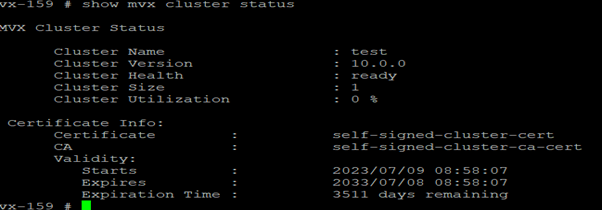
Enable broker role on the cluster node and check the status:
mvx node broker enableNote
This step is required only for versions prior to 11.0.0. In version 11.0.0 and later, the broker enables automatically upon cluster formation.
When a cluster creation fails or becomes unstable, forcefully break the cluster to create a new one.
mvx node detach forceView VX cluster sample submissions.
To display overall submission stats,
show mvx submissionTo display malicious submissions info,
show mvx submission maliciousTo display submissions info based on md5sum,
show mvx submission md5sumTo display submissions info based on sha256,
show mvx submission sha256To display submission info for a specific uuid,
show mvx submission uuid
For detailed information on the list of commands, see KB97021.