Inline multi-proxy deployment requires two network port pairs. This can be accomplished using a Network Security appliance with two port pairs, or one port pair from each of two Network Security appliances.
For details about inline deployment with multiple proxy servers, refer to the Hardware Administration Guide for your appliance model.
Note
Starting with version 7.1.0, Network Security appliances bypass packets larger than 1650 bytes rather than dropping them.
Operator or Admin access
Configuring inline multi-proxy mode with one Network Security appliance
Use the Policy Settings page for inline multi-proxy mode to configure a deployment with one Network Security appliance with two network port pairs. Interface A connects the LAN-facing switch or router (A1) to the proxy server (A2). Interface B connects the LAN-facing switch or router (B1) to the Internet-facing switch or router (B2). Additional Network Security appliances connect to one or more additional proxy servers.
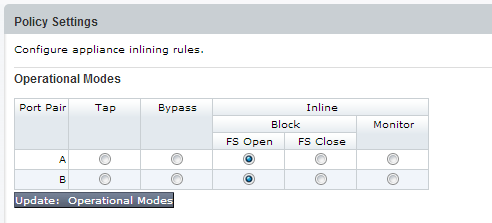
Operational modes for inline deployment are described in the following table.
Mode | Description |
|---|---|
Block | Blocks malicious traffic (recommended).
|
Monitor | Monitors the traffic and generates alerts on malicious events. |
Bypass | Forced bypass wherein the Network Security appliance neither blocks nor analyzes traffic. |
Use the Policy Settings page for inline whitelists to configure interface A2 to allow incoming traffic from the proxy server to pass through unblocked.

Click the Settings tab.
Click Inline Operational Modes on the sidebar.
Select a blocking option for pair A and pair B. (Inline Block FS Open is recommended).
Click Update: Operational Modes.
Select Inline Whitelists on the sidebar. Enter the information for the proxy server and then click Add Whitelist.
Click the Settings tab.
Click Inline Operational Modes on the sidebar.
Select a blocking option for pair A and pair B. (Inline Block FS Open is recommended).
Click Update: Operational Modes.
Select Inline Whitelists on the sidebar. Enter the information for the proxy server and then click Add Whitelist.
Repeat Steps 1–5 on each additional Network Security appliance.
Configuring inline multi-proxy mode with two Network Security appliances
Use the Policy Settings page for inline multi-proxy mode to configure deployment with two Network Security appliances with one network port pair each. NX Appliance1 is inline between a LAN-facing switch or router and an Internet-facing switch or router. The Network Security appliances NX Appliance2—NX Appliance n connect to multiple proxy servers offline.
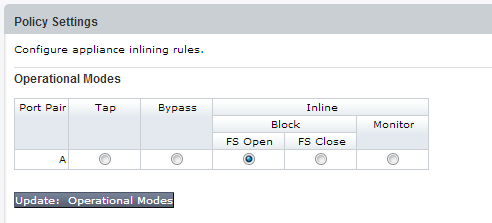
Operational modes for inline deployment are described in the following table.
Mode | Description |
|---|---|
Block | Blocks malicious traffic (recommended).
|
Monitor | Monitors the traffic and generates alerts on malicious events. |
Bypass | Forced bypass wherein the Network Security appliance neither blocks nor analyzes traffic. |
For each appliance connected to a proxy server, use the Policy Settings page to configure interface A2 to allow incoming traffic from the proxy server to pass through unblocked.
Click the Settings tab.
Click Inline Operational Modes on the sidebar.
Select a blocking option for pair A. (Inline Block FS Open is recommended).
Click Update: Operational Modes.
Select Inline Whitelists on the sidebar. Enter the information for the proxy server and then click Add Whitelist.
Click the Settings tab.
Click Inline Operational Modes on the sidebar.
Select a blocking option for pair A. (Inline Block FS Open is recommended).
Click Update: Operational Modes.
Select Inline Whitelists on the sidebar. Enter the information for the proxy server and then click Add Whitelist.
Repeat the preceding steps on each additional Network Security appliance.