Use the menu options in this section to configure local Certificate Revocation List (CRL) file updates. You can configure how often the NDR appliance downloads a new local or remote CRL file and specify the remote location of a CRL file.
To configure local CRL file updates:
Log in to the NDR as npadmin using the NDR IP address or FQDN. For example:
$ ssh npadmin@10.1.0.1or
$ ssh npadmin@exampleFQDNEnter privileged mode:
npadmin@ia> enableEnter the npadmin password. The password can be 5 to 24 characters long.
[sudo] password for npadmin: <password>Enter configuration mode:
npadmin@ia# configure systemEnter configuration CAC menu.
npadmin@ia(config)# authenticationIn the CAC/PIV configuration menu, select
2to configure the current authentication method.In the PKI Configuration menu, select
3to enter the CRL Configuration menu. The following appears: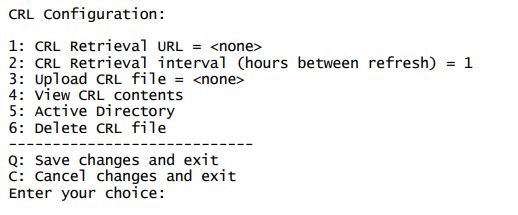
Select
3to upload a CRL file to the appliance. Upload the CRL file to /home/npscp/transfer/.In the CRL Configuration menu, select
1to enter the URL of the direct path to the certificate file.The URL is specified with remote server Administrator credentials ( and ), the remote server (), the path and filename in which to save the certificate bundle () in the following format:
scp://<username>[:<password>]@<hostname>/<path/filename>Note
If you do not include the password, the configuration menu prompts for the password and obfuscates the keyboard input as you type it.
In the CRL Configuration menu, select
2to set the time interval in hours for how often the appliance downloads a new CRL file.Select
Xto exit the menu.