No lists are populated in Helix Enterprise until you create them. Use the following procedure to create a list.
Note
Newly created lists may take up to two minutes to appear in search results.
From the main menu, select Configure > Lists.
Click Create List on the Lists page.
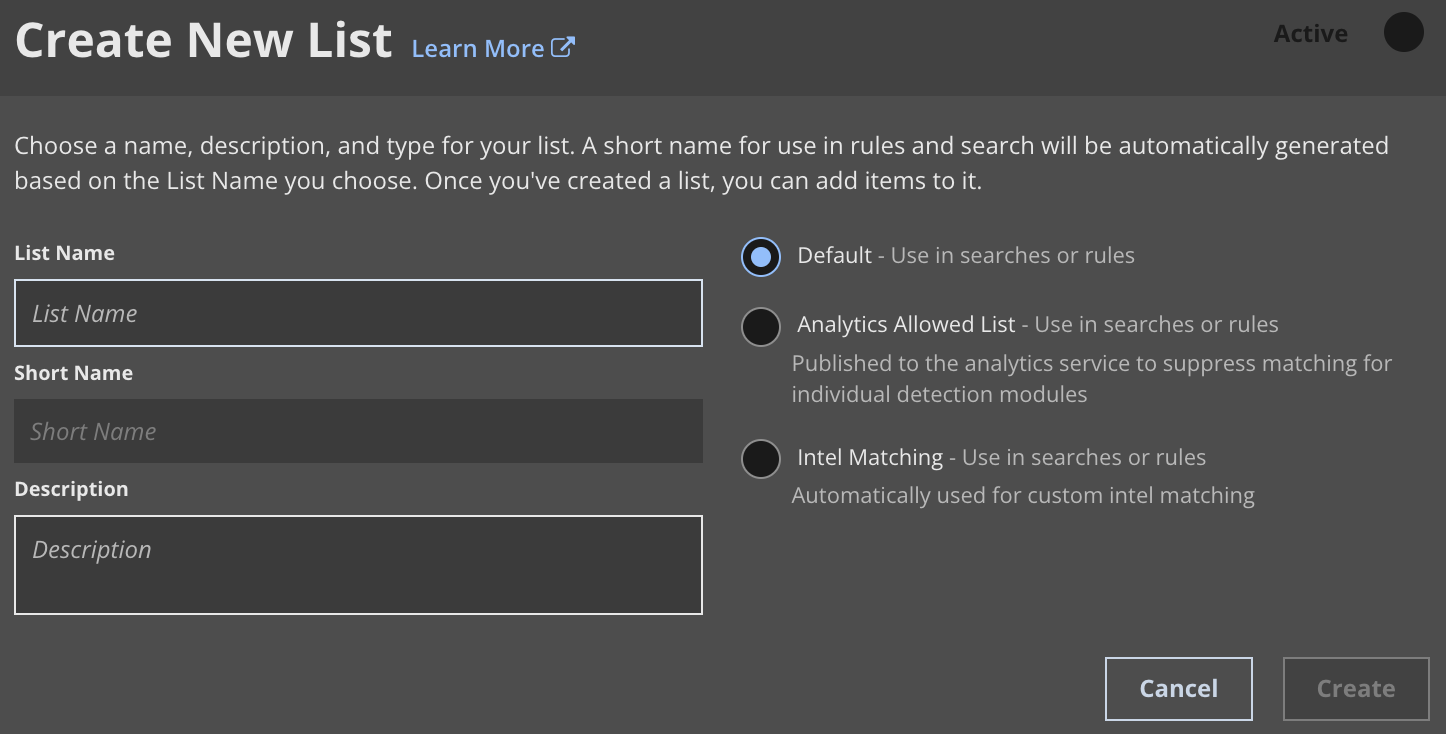
Enter a list name. Consider avoiding uppercase characters in the name. If you use the list name in a query, you must replace any uppercase characters with lowercase characters. See Understanding list attributes.
(Optional) Add a description.
Select Default, Analytics Allowed List, or Intel Matching as the list type.
Slide the toggle to make the list Active or Inactive. Lists are Active by default.
Click Create.
Important
Wildcards and aliases are not supported in lists. Each line is interpreted as an "
or" Boolean operator in a query (that is, any search using the list will look for every item).If you intend to create a list of IP addresses and use that list against an IP address field (such as
srcipv4ordstipv4), then all of the items in the list need to be IP addresses. You cannot mix domain names and IP addresses in the same list or the search will fail.Add indicators to the list. See Adding indicators to a list.