By default, both management and DTI traffic use the ether1 network interface, which needs Internet access for DTI network downloads and uploads. For security, you might want to isolate the management traffic by streaming it from an out-of-band network interface with no Internet access.
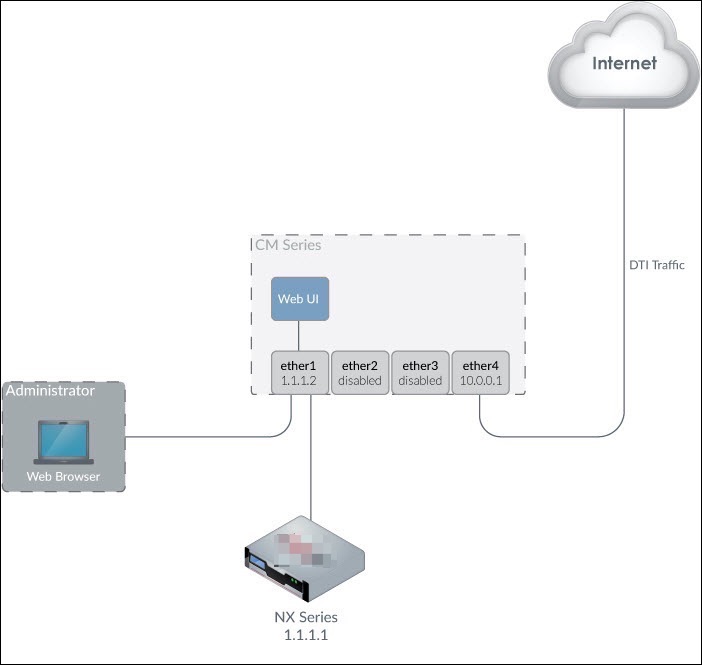
To split the DTI traffic from the ether1 interface, you need a dedicated network interface on the Central Management System appliance that is connected to the Internet, as shown in the following illustration. The default gateway of the managed appliance must be reconfigured to this interface. If the managed appliance and the Central Management System appliance are in different subnets, a static route must be configured to stream the management traffic from the ether1 interface.
Important
After traffic is split, accessing the management interface through the Web UI or the CLI must be done from clients in the same subnet as the management interface.
Admin access
Dedicated port for Internet access. For example, in a standard Central Management System deployment, the ether2, ether3, and ether4 ports are unused and can be used for this purpose. (On some appliances, ports are labeled pether). For details, see the Central Management SystemHardware Administration Guide for your Central Management System model.