Enabling and disabling PX metadata filters
To enable PX metadata filters:
Click  and from CONFIGURATION, select PX Filters.
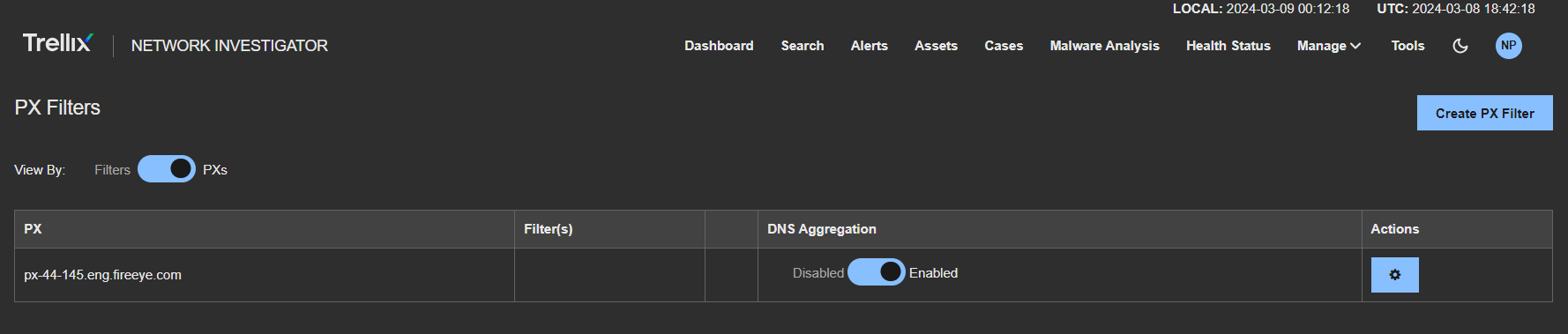
Toggle the filter switch to PXs to view all of the PX metadata filters.
From the PX Filters list, select the PX metadata filter you want to enable.
Toggle the filter's Disable and Enabled switch to enabled.
To disable PX metadata filters:
Click and from CONFIGURATION, select PX Filters.
Toggle the filter switch to PXs to view all of the PX metadata filters.
From the PX Filters list, select the PX metadata filter you want to disable.
Toggle the filter's Disable and Enabled switch to Disabled.
Was this article helpful?
Related articles
Intrusion Prevention System (IPS) > Network Detection and Response (NDR) > NDR 4.x > Network Detection and Response Product Guide 4.x > Investigation and Analysis > Filtering > PX metadata filters
Intrusion Prevention System (IPS) > Network Detection and Response (NDR) > NDR 4.x > Network Detection and Response Product Guide 4.x > Investigation and Analysis > Filtering > PX metadata filters
Intrusion Prevention System (IPS) > Network Detection and Response (NDR) > NDR 4.x > Network Detection and Response Product Guide 4.x > Investigation and Analysis > Filtering > PX metadata filters