You can set up the NDR to receive alerts from other appliances by setting up the HTTP Listener. You must configure the NDR and then the other appliance(s).
The NDR HTTP listener is configured using the CLI.
Configure the NDR appliance
To configure NDR appliance for the HTTP Listener:
Log in to the NDR as npadmin using the NDR IP address or FQDN. For example:
$ ssh npadmin@10.1.0.1or
$ ssh npadmin@exampleFQDNEnter privileged mode:
npadmin@ia> enableEnter the npadmin password. The password can be 5 to 24 characters long.
[sudo] password for npadmin: <password>Enter configuration mode:
npadmin@ia# configure systemEnter the alert aggregation menu:
alertaggregatorAt the alert menu, type
Aand then pressEnterto add a new endpoint.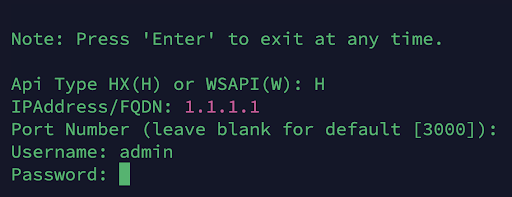
Type the api type HX as H.
Provide the api address.
Press
Enterin the Port Number field to retain default value.Provide the username as
admin.Type the endpoint security server password and then press
Enter.
From the alert aggregator menu, select
endpoint security serverby its index.On the Edit / Delete Endpoint menu, type
Tto toggle alert polling for the device and turn it ON.Type
Xand pressEnterto save the configuration.Type
Xand pressEnterto save and exit the endpoint configuration menu.