When global host-key authentication is enforced on a managed appliance, you must obtain the public host-key from the Central Management System appliance and import it into the managed appliance global host-keys database. This is described in Host-key authentication.
The Central Management System appliance host-key string includes its IP address. If the Central Management System appliance in an internal network behind a NAT gateway, the IP address in the key string you obtain from the Central Management System appliance Web UI or CLI must be replaced with the virtual IP address that is mapped to the Central Management System appliance on the NAT gateway.
Example
In this example, the Central Management System appliance is behind the NAT gateway. Its IP address is 1.1.1.5, and its virtual IP address is 3.3.3.5.
Note
This example is from an Email Security — Server appliance, but it is representative of other managed appliances as well.
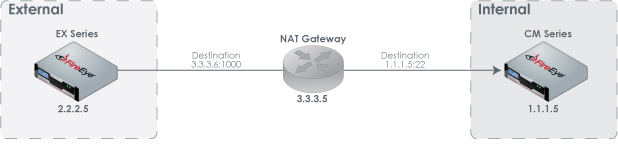
The host-key string you obtain from the Central Management System appliance Web UI or CLI starts with "1.1.1.5". For example:
1.1.1.5 ssh-rsa AAAAB3NzaC1yc2EAAAADAQABAAABAQCzd5JwKBjHLe/jxkF0JzWcXOTw9l0
bz2SctkQrihkqg/zXqrmxAfgbzYulDSIxOKZTh2VBnKsy0qRWrCps64Itlh6iRlr7Jxa+jAtTAGsy
...Before you import the host-key into the Email Security — Server appliance global host-keys database, you must replace "1.1.1.5" with "3.3.3.5." For example:
3.3.3.5 ssh-rsa AAAAB3NzaC1yc2EAAAADAQABAAABAQCzd5JwKBjHLe/jxkF0JzWcXOTw9l0
bz2SctkQrihkqg/zXqrmxAfgbzYulDSIxOKZTh2VBnKsy0qRWrCps64Itlh6iRlr7Jxa+jAtTAGsy
...