Intelligent Sandbox integrates with other Trellix and third-party products to provide you a multilayered defense mechanism against malware.
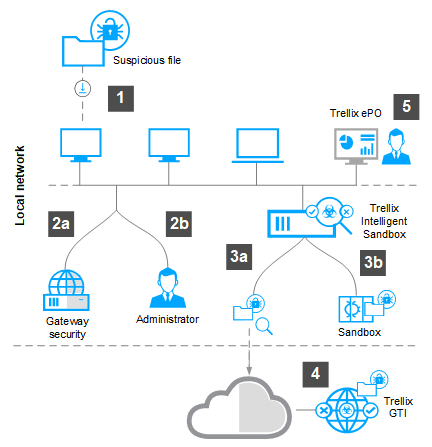
This workflow gives you a high-level overview of how Intelligent Sandbox works.
A system tries to download a file with an embedded threat.
The file is:
Automatically redirected to the McAfee Web Gateway where it's compared to known threats. If the file is deemed suspicious, it is redirected to Intelligent Sandbox.
Manually submitted for analysis to Intelligent Sandbox by the administrator.
Once the file reaches Intelligent Sandbox, one or both of these occur:
The file hash of the file is compared to the file hashes in Trellix GTI .
The file is executed and observed in a sandbox to find if there is a threat enclosed.
If a threat is found when the file is opened, the threat is reported to Trellix GTI and all other connected security products. This allows you and your security products to take preventive measures such as blocking the file or quarantining the affected hosts.
If your Intelligent Sandbox is managed by ePO - On-prem, a notification of the threat is sent to ePO - On-prem and the administrator.
 |