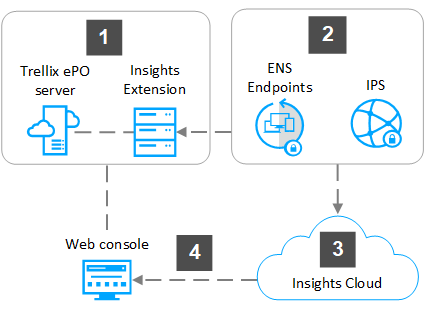
Insights works in your managed environment to monitor your endpoints and collect intelligence from the Insights cloud.
Insights is installed and managed on a ePO - On-prem on-premises server.
Insights uses Trellix Endpoint Security (ENS) 10.7.0 for Windows or later and Trellix Agent 5.6.0 or later to connect to endpoints, and Trellix IPS 9.0 or later to connect to the URLs, IP addresses, and domains in your environment.
Insights Cloud receives information from Trellix Research about campaigns.
Insights Cloud reports campaigns and IoC related information for viewing in the Insights user interface in the ePO - On-prem web console.
Insights > Trellix Insights Product Guide > Getting started with Trellix Insights > How Trellix Insights works on ePO - On-prem > Set up Trellix Insights on ePO - On-prem
Insights > Trellix Insights Product Guide > Getting started with Trellix Insights > How Trellix Insights works on ePO - On-prem > Set up Trellix Insights on ePO - On-prem