A Central Management System cluster consists of two identical Central Management System appliances (or nodes). The node to which the appliances are connected is designated the primary node during the initial configuration, and the other node is designated the secondary node. The two nodes are connected to each other through a default high availability (HA) link (or interface). An optional backup HA interface is activated if the default HA interface fails. If you start the cluster engine on the primary node first, the primary node is active and the secondary node is standby.
The primary node management configuration (except for interface, licensing, DTI credentials, and host-specific settings) is continuously synchronized to the secondary node. If alert data and security content replication is enabled, aggregated alert data and security content updates from the managed appliances are also synchronized to the secondary node. The health of the primary node is monitored continuously. If specific conditions are met, the primary node fails over. The secondary node takes over immediately as the primary node, and establishes a new connection with the managed appliances.
Important
Starting in Release 7.9.0, the DTI configuration is not synchronized as part of the Central Management System HA configuration. Make sure both nodes have valid DTI credentials; otherwise, after a failover, the promoted secondary node may be unable to communicate with the DTI network. For clusters that were created before Release 7.9.0, the DTI credentials are already synchronized, and should be the same on both nodes. After upgrading such a cluster to Release 7.9.0, both nodes will retain the shared credentials. However, subsequent changes made to the DTI configuration will not be synchronized.
You can configure and manage the primary node Central Management System appliance and its managed appliances from either the Web UI or the CLI of the primary node. You can monitor the cluster from the CLI of either node, or from the Web UI of the primary node. You must use the CLI to configure and manage the cluster. Global cluster settings can be configured from either node, but local settings must be configured on each node.
Cluster modes
The cluster can operate in the following modes:
High availability (HA). In a typical HA deployment, the goal is immediate recovery of all services. The two nodes are in the same subnet and are typically at the same site. There is little down time and no data loss, because the high-bandwidth link allows all data to be replicated to the secondary node.
Disaster recovery (DR). In a typical DR deployment, the goal is a safe and stable recovery of services after a reasonable amount of time. The two nodes are usually in different data centers that are geographically separate from each other. Alert data replication is typically disabled to reduce the amount of traffic on the low-bandwidth WAN link. In a DR deployment, the purpose of the secondary (or DR) node is to store a copy of the replicated data from the managed appliances, not to assume the primary role and take over the management of appliances. If there is a catastrophe such as a natural disaster at one site, an administrator can manually recover the replicated data from the node at the unaffected site.
Deployment options
All HA traffic (monitoring and control; and configuration, alert data, and security content replication) flow through the default HA interface. A backup HA interface, if configured, is activated only when there is a failure on the default HA interface. If the two nodes are in different subnets, IP routing is required. The basic cluster deployment options follow:
Single interface (default). The ether1 interface is the default HA interface. It is enabled by default, and was already configured during the initial configuration of the Central Management System appliance. Because ether1 is the management port, both normal management traffic and HA monitoring and control traffic pass through the same port. This is the simplest option to configure.
Single interface (non-default). You can configure a different interface (for example, ether3) as the default HA interface instead of ether1. This option can be used to prevent the management port from becoming too busy.
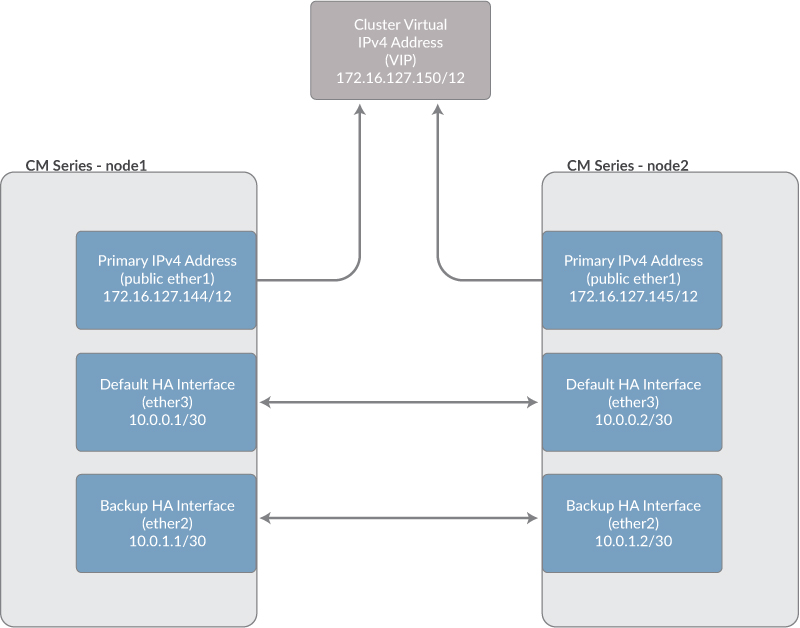
Dual interface. In this scenario, one interface (for example, ether3) is the default HA interface, and another interface (for example, ether2) is the backup HA interface.
WAN or LAN. In a WAN deployment, the two nodes are in different subnets. In addition to the interface configuration, you must configure static routes that allow the traffic to reach the destination. This is not necessary in a LAN deployment, because the two nodes are in the same subnet.
Microsoft Azure. See the Trellix Device Deployment Guide for details about configuring HA with virtual Central Management System appliances in an Azure environment. The information covers a LAN deployment where the two nodes are in the same Azure region, and a WAN deployment where the two nodes are in different Azure regions.
Note
The dual interface option is not recommended for WAN deployments.
The following diagrams illustrate example deployment scenarios.
Example: Dual-interface LAN deployment
In this example, both nodes are in the same subnet. The default HA interface pair and the backup HA interface pair are each connected with a crossover Ethernet cable. A virtual IP (VIP) address in the same subnet as the two nodes is configured for Web UI access (see Virtual IP address ).
Example: WAN deployment
In this example, the two nodes are in different subnets. Static IP routes must be configured in the routing tables of the HA gateways. This allows the traffic to be carried between the two nodes.

Resource agents
A resource agent allows the cluster engine to interact with a specific service or resource. A resource agent monitors the state of a service. Some resource agents can manage a service by turning it on or off, transferring it to the standby node during a failover, and so on. You can disable a resource agent without affecting other resource agents or the overall cluster operation. For example, if you stop the database resource agent, the database monitoring stops, but the database and the services that depend on it continue to run.
There are two categories of resource agents:
System health resource agents monitor system health. A failover can be triggered when specific conditions are met. System health resource managers run on both nodes. Their names start with the prefix
sys_. For example,sys_disk_monitormonitors the available disk space, andsys_ether1_monitormonitors the management (ether1) interface.FireEye service resource agents monitor and manage Central Management System services. Each resource agent has a clone that runs on the other node. The resource agent on the standby node is normally in the "stopped" state. Their names start with the prefix
fe_. For example,fe_aggregatormonitors and manages the aggregation of alert data from managed appliances, andfe_notificationmonitors and manages the service that sends malware alert notifications.
For a description of each resource agent and its normal state on the primary and secondary nodes, see Viewing resource agent status .
Alert replication
Alert replication is enabled by default. The alert data that the Central Management System appliance aggregated from its managed appliances is passed to the secondary node when the cluster is formed, and then continues to be passed to the secondary node. You can disable alert replication on the cluster in disaster recovery (DR) deployments and other low-bandwidth scenarios in which you need to limit the amount of traffic passing through the HA interface. For details, see Configuring alert replication using the CLI and Configuring automatic failover using the CLI.
If you disable alert replication, the alert data is not lost; after the appliances are connected to the new primary node, the primary node gradually re-aggregates the alert data. Because a specific resource agent manages the replication of alerts, disabling alert replication does not affect the overall failover functionality. Continuous configuration replication remains enabled, regardless of the alert data replication status.
Security content replication
Security content replication is enabled by default. The security content updates on the primary node are passed to the secondary node when the cluster is formed, and then continue to be passed to the secondary node. You can disable security content replication on the cluster in low-bandwidth scenarios in which you need to limit the amount of traffic passing through the HA interface. For details, see Configuring security content replication using the CLI and Configuring automatic failover using the CLI .
If you disable security content replication, the security content updates are not lost; after the appliances are connected to the new primary node, the primary node gradually receives the updates. Because a specific resource agent manages the replication of security content updates, disabling security content replication does not affect the overall failover functionality. Continuous configuration replication remains enabled, regardless of the security content replication status.
Virtual IP address
You can view the Web UI of the primary node, but not the secondary node. In a local area network (LAN) deployment, you can assign a virtual IP (VIP) address for the cluster. You cannot use a VIP address in a wide area network (WAN) deployment.
The VIP address is dynamic and moves from node to node, depending on which node has the primary role. To access the Web UI, you use the VIP address, instead of the management port's IP address or hostname. You do not need to determine which node is primary before logging in to the Web UI.
Important
The resource agent that manages the VIP address is disabled by default. The VIP address must be defined before you enable the resource agent. If you disable the resource agent later, the VIP address remains in the cluster configuration.
Automatic failover
By default, the primary node automatically fails over to the secondary node if an unrecoverable failure occurs. You can disable automatic failover and instead fail over manually after receiving notification of a failure event. In a disaster recovery (DR) deployment, you typically disable automatic failover. You can also disable automatic failover for troubleshooting. Automatic failover can be enabled or disabled on both nodes, or enabled on one node and disabled on the other. For details, see Configuring automatic failover using the CLI .
Split-brain handling
A split-brain condition occurs when a failure in the HA interface causes communication and data synchronization to stop. The secondary node cannot determine whether the primary node crashed or whether the primary node is healthy, because the communication link is broken and there is no heartbeat. The secondary node attempts to take over the primary role. If the primary node is in fact healthy, the two nodes are now operating independently instead of as a cluster pair.
To resolve the split-brain condition, the cluster resource manager determines which node should be primary. If both nodes are configured and have connected appliances, the node with the majority of connected appliances is selected as the primary node. If the two nodes have the same number of connected appliances, a string comparison function compares the hostnames of the nodes and breaks the tie.
After the primary node is selected, if automatic shutdown is enabled, the other node's cluster engine is stopped. If automatic shutdown is disabled, the other node's cluster engine continues to run. For details, see Configuring automatic shutdown for a split-brain condition using the CLI .
Monitoring
The state of all cluster components is monitored continuously. If automatic failover is enabled, failover occurs when specific conditions are met. You can also manually fail over to the secondary node after receiving notification of specific conditions. For information about monitoring the cluster status, see Cluster health and performance .
Notifications
Cluster events can generate the following types of notifications:
Email notifications
SNMP traps
Log messages saved in local log files or sent to a remote syslog server
Encryption
All traffic sent through the HA interfaces is encrypted. Encryption is enabled by default and cannot be disabled. A unique encryption key for each cluster is automatically generated, and can be viewed from the CLI of each node. Both nodes in the cluster must have the same key. For details, see Viewing the cluster configuration.
Authentication
The Secure Shell (SSH) protocol is used for secure communication between the two Central Management System appliances (nodes) in a Central Management System cluster. When the cluster is formed, a key exchange takes place. The secondary node sends a copy of its host key for each HA interface to the primary node, where it is compared to the keys in the primary node host-keys database. If strict host-key checking is enabled, the cluster can be formed only if the key for each interface matches an entry in the local host-keys database for the primary node remote user. If global host-key checking is enabled, the cluster can be formed only if the key for each interface matches an entry in the global host-keys database for the primary node. For details, see Host-key authentication.
Control and troubleshooting
Various operations allow you to control, test, and troubleshoot the cluster. For example, you can enable or disable resource agents, restart the cluster engine, manually fail over the primary node, and so on.
Database backup and restore
Restoring a database backup on a Central Management System HA node could break the HA cluster. A warning is displayed when you attempt to do this. For details about database backup and restore, see the Central Management System Administration Guide.
Appliance management
Appliances can be added to a Central Management System appliance for management in two ways:
A Central Management System administrator can add an appliance directly from the Central Management System appliance. This is a server-initiated connection.
An appliance administrator can send a request for management to the Central Management System appliance, and a Central Management System administrator can accept or reject the request. This is a client-initiated connection.
Caution
A client-initiated connection to the primary Central Management System HA node is only supported in a LAN deployment (in which both nodes are in the same subnet), and when a VIP address is configured.
For details about adding appliances for management, see the Central Management System Administration Guide.