These requests allow you to submit unknown malware objects to an appliance through the Central Management System appliance for detailed analysis. You can also submit unknown malware objects or URLs directly to an appliance (version 7.7.0 or higher). Submissions can be a single file, or an archive of multiple files. Individual files within the archive are processed independently. You can also use these requests to review the malware object or URL submissions and the status of each submission.
The following flow chart shows how to submit a malware object. On appliances other than Central Management System, a similar process is used to submit URLs.
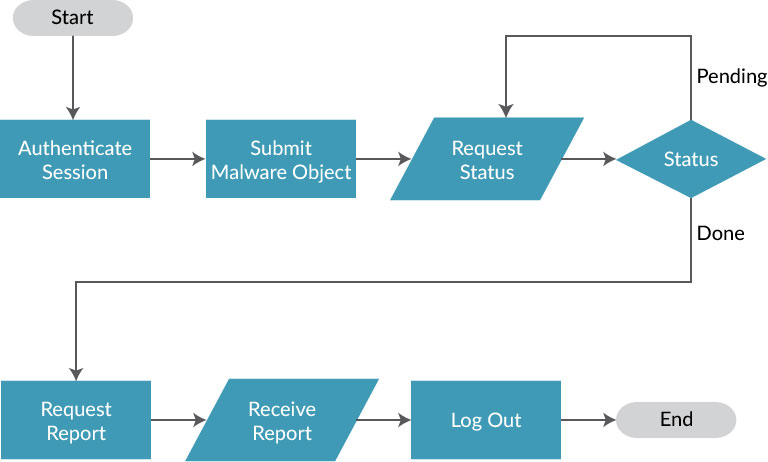
For each malware object submitted, you need to include a submission options attachment that includes a JSON-formatted option string and a submission object file that includes the malware object to be tested.
After the malware object is submitted, the appliance returns a submission key. You use this key to determine the status of the submission and to retrieve the completed analysis report.
Submission key format on Central Management System appliances
The submission key format is as follows:
xxx_y
xxx—Submission numbery—Non-Central Management System appliance sensor ID within the Central Management System appliance
For example:
245_3
Submission key format on other appliances
The submission key format is as follows:
xxx
xxx—Submission number, which can be any length.
For example:
7709
When you submit URLs, the appliance returns a list ID. You use this ID to determine the status of the submission and to retrieve the completed analysis report.
This section covers the following:
Note
The submit file request replaces the submit malware object request.
Submitting malware objects. For more information, see Submit malware object request.
Submitting files. For more information, see Submit file request.
Submitting URLs. For more information, see Submit URL request.