Global feed sharing is globally disabled by default. An IAM organization admin with the appliance.role.admin entitlement can enable global feed sharing. In a federated setup, parent and child organization admin users must enable global feed sharing on their own organizations. The feed propagation uses the API key of the admin user who enabled the sharing.
Federated feed sharing is also disabled by default. An IAM organization admin with the tap.federated.intel_feed entitlements can enable federated feed sharing. Federated feed sharing can be enabled on the parent and child organizations, or enabled only on select child organizations. The name of the organization that propagated the feed is included in the feed name.
Federated feed sharing is automatically disabled if global feed sharing is disabled. An admin user cannot disable global feed sharing if federated feed sharing is enabled, unless that user has both the appliance.role.admin and tap.federated.intel_feed entitlements.
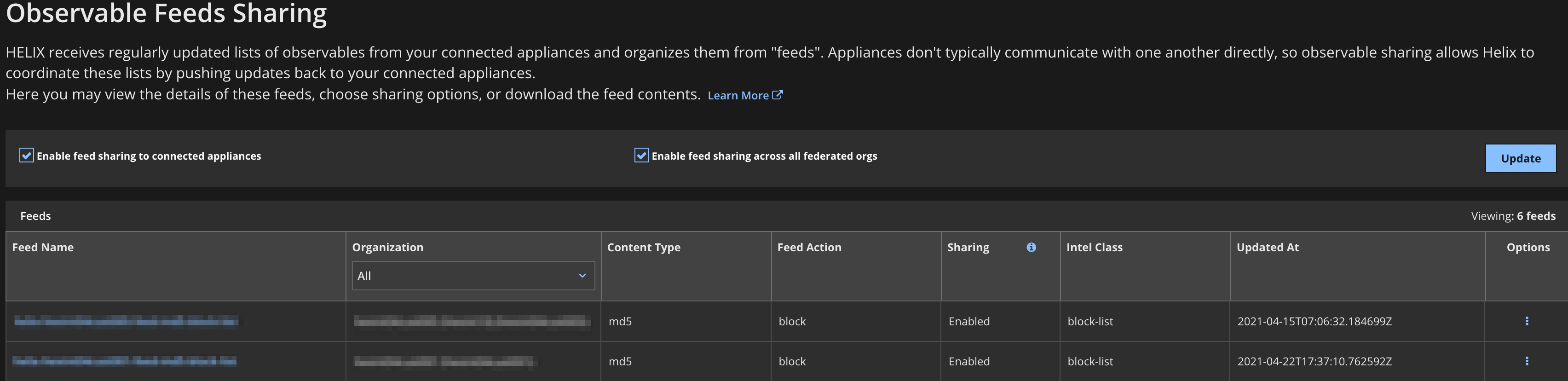
Use the Observable Feeds Sharing page to enable or disable global feed sharing, enable or disable federated feed sharing, view feed information and status, and navigate to the feed details page. In a federated setup, the Observable Feeds Sharing page for a parent organization shows both parent and child organization feeds. You can use the Organizations column on the page to filter the feeds by organization. The Observable Feeds Sharing page for a child organization shows only its own feeds.
Important
There are two versions of IAM. If the URL you use to access the IAM UI ends with
fireeye.com, this document pertains to you. If the URL you use to access the IAM UI ends withtrellix.com, see the Trellix IAM Guide for information regarding IAM.
Note
The following illustration shows the federated view of the page.
Log in to your organization as a user with the
appliance.role.adminentitlement.From the main menu, select Manage > Observable Feeds Sharing.
Select or clear the Enable feed sharing to connected appliances checkbox.
Click Update.
Note
In a federated setup, the admin user for each parent and child organization must perform this procedure separately, because the propagation uses the API key of the user who enabled feed sharing.
Log in to your organization (parent or child) as a user with the
tap.federated.intel_feedsentitlements.From the main menu, select Manage > Observable Feeds Sharing.
If you are enabling sharing, make sure the Enable feed sharing to connected appliances checkbox is selected.
Select or clear the Enable feed sharing access across all federated orgs checkbox.
Click Update.