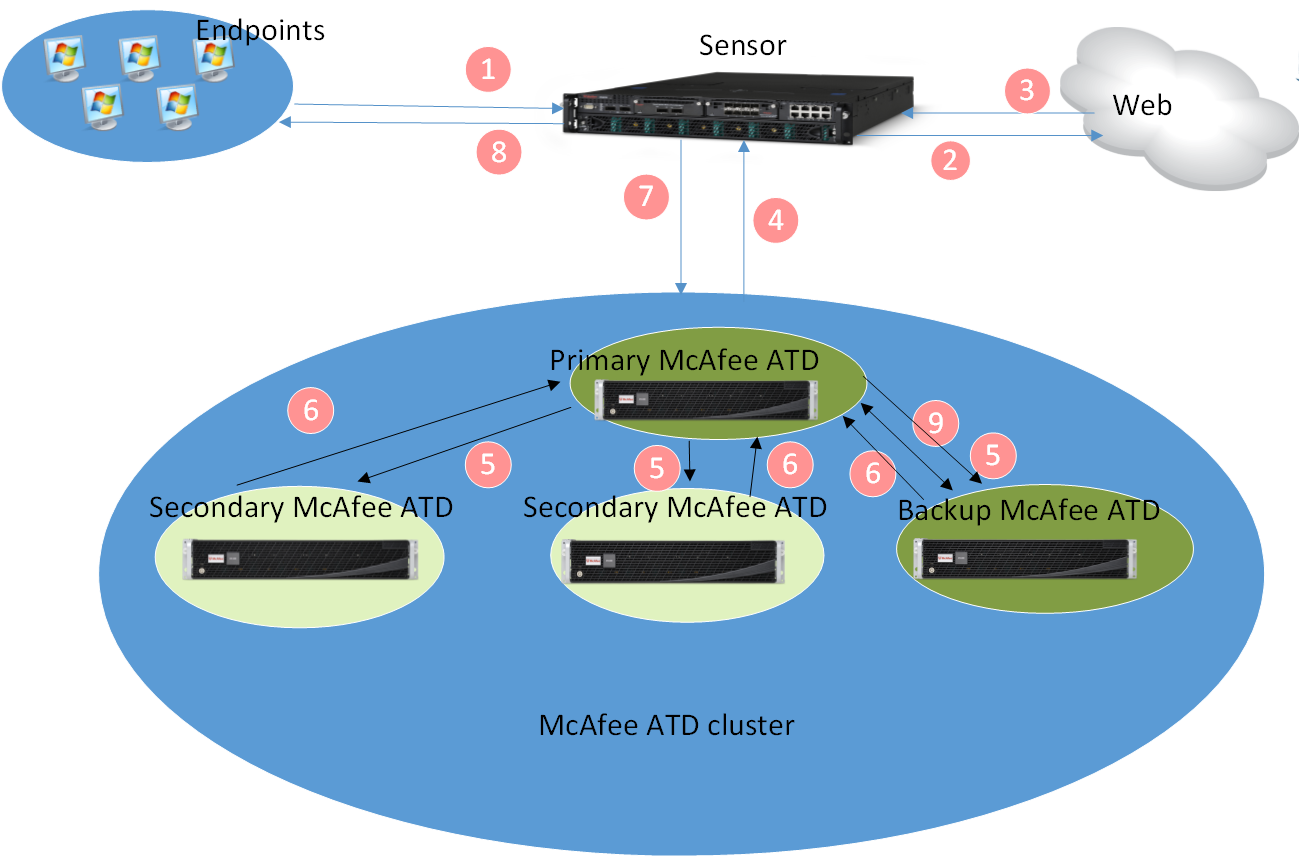
Consider a scenario where Web Gateway is between the endpoints on your network and the Web. The Web Gateway appliance is integrated with a Intelligent Sandbox cluster consisting of three Intelligent Sandbox Appliances.
 |
Number | Description |
|---|---|
1 | The endpoints attempt to download web objects. |
2 | Web Gateway forwards these requests. |
3 | When a file is downloaded, the native Trellix Gateway Anti-malware Engine on Web Gateway scans the file and determines the malware score. |
4 | Based on the file type and the malware score, Web Gateway determines if the file needs to be sent to Intelligent Sandbox for analysis and, if needed, forwards the file to the primary Intelligent Sandbox's management port. |
5 | The primary Intelligent Sandbox distributes such files among the nodes based on the number of files submitted to a node. A highly burdened node receives lesser number of samples for processing as opposed to a less burdened node. All communication between the members in a cluster is over their management ports. Assume that the file is sent to one of the secondary Intelligent Sandbox for analysis. The secondary Intelligent Sandbox returns the job ID and task ID to the primary node and begins to analyze the file. The primary node, in turn, returns the job ID and task ID to Web Gateway. |
6 | For the analysis reports, Web Gateway queries the primary node with the task ID. Using the task ID, the primary node identifies the Intelligent Sandbox that analyzed the file and pulls the reports from it. |
7 | In response to the query from Web Gateway, the primary Intelligent Sandbox forwards the reports. |
8 | Based on the report from Intelligent Sandbox, Web Gateway allows or blocks the file accordingly. |
9 | Backup Intelligent Sandbox assumes Primary Intelligent Sandbox role if Primary Intelligent Sandbox goes down for some reason. |
Note
When Web Gateway queries for an MD5 hash value with time period (without the job or task ID), the primary node checks the MD5 hash in its database. If there is no matching record, the primary node checks the secondary nodes where the file is analyzed and sends the report back to Web Gateway without analyzing the corresponding file again.
When Web Gateway queries for an MD5 hash value for a running task (without the job or task ID), the primary node checks the MD5 hash with status (pending or analyzing) in its database. If there is no matching record, the primary node checks the secondary nodes where the file is being analyzed or is in the queue. Then the primary node sends the task details back to Web Gateway without analyzing the corresponding file again.