Process trace displays details for processes executed on your endpoints in graph format.
Process trace can be accessed from the following locations:
Campaign > View Details > Your Environment > Your ENS Devices > All Impacted Devices
Devices > Events
Search results -> Events
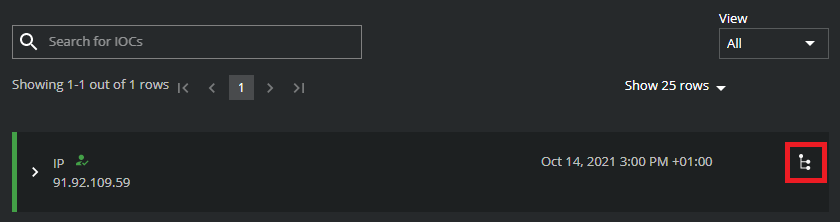
If a trace is available for an event, a graph icon is enabled. A graph icon does not appear where no trace data is available.
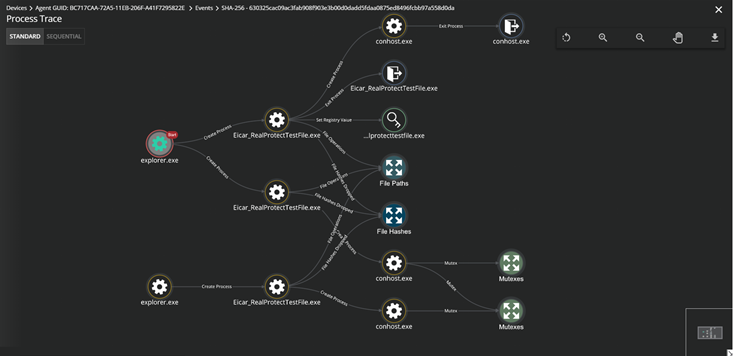
Graph layout and toolbars
The graph can be viewed in two different layout formats:
Standard (default layout) - nodes are connected in the order in which they were created.
Sequential - nodes are connected in the order in which the process was executed. Sequential layout displays a time bar to filter the graph by a selected time range.
Users can perform the following actions using the toolbar:
Zoom in, zoom out, reset, and use full screen mode for improved visibility.
Download the graph in high-resolution PNG format.
Nodes
Node details and pivots are shown when clicked.
Nodes are grouped and sub-grouped based on categories and subcategories. For processes, nodes are grouped where process activity occurs more than once. Nodes are further sub-grouped based on additional activities including read file, write file, and more.
More prominent nodes with multiple incoming and outgoing connections are excluded from the grouping.
Nodes | Group/Subgroup nodes | Edges |
|---|---|---|
ePO | Files Created | Artifacts dropped |
BPS | File Paths | Has device |
Device Name | IPs/Domains | Observed file |
Agent Guild - <agent GUID> | Registries | Observed URL |
Campaign Name | File Hashes | Dropped by |
File path | Hidden Files Created | Drops file |
Mutex | AMSI Buffers | Downloaded from URL |
File Hash MD5 | Registries Set | Downloads file |
Process | Directories Created | Is a threat |
Registries Created | Has domain | |
Files Read | Domain of | |
Registries Deleted | Is associated with | |
Files Written | Downloaded from domain | |
Files Deleted | Mutex | |
Files Modified | Is associated with campaign | |
Files Moved | Create Registry Key | |
Files Copied | Set Registry Value | |
Directories Deleted | Delete Registry Key | |
TCP Connections | Create Process | |
TCP Connections Accepted | Exit Process | |
UDP Connections | Inject DLL | |
UDP Connections Received | Loads DLL | |
DLLs Injected | Create File | |
DLLs Loaded | Write File | |
Mutexes | Delete File | |
MD5s Dropped | Read File | |
IPs Connected | Modify File | |
Domains Connected | Move File | |
Downloaded URL | Copy File | |
Create Directory | ||
Delete Directory | ||
Create Hidden File | ||
Connect TCP | ||
Accept TCP | ||
Send UDP | ||
Receive UDP | ||
Create Registry Key | ||
Set Registry Value | ||
Delete Registry Key | ||
Downloads File | ||
Create Pre-Process | ||
AMSI Buffer Scan | ||
File-MD5 | ||
Manages | ||
Uses Technique | ||
Involves | ||
Mitigation | ||
Has Sighting | ||
Observed in | ||
Reported in | ||
Belongs to | ||
Associated with | ||
Uses Tool | ||
Uses Malware | ||
Uses | ||
File Hashes Dropped | ||
File Operations | ||
Network Operations | ||
Registry Operations | ||
Operations | ||
Create Remote Thread | ||
File Hash Dropped | ||
Orphan Thread |
Node | Details Shown |
|---|---|
Process/Exit Process |
|
File Path |
|
File Hash MD5 |
|
Mutex |
|
Campaign |
|
Device |
|
IP/Domain |
|
Groups/Subgroups | Double clicking on a group or subgroup expands and displays all associated nodes |
ePO, NSP, NSM, BPS | No details |
MITRE related nodes |
|