Use the menu options in this section to refresh a local Certificate Revocation List (CRL) file by downloading a new file from a specified remote location so that the NDR appliance can validate certificate revocation. Only one CRL file can be present on the system. When you download a new CRL file, the existing CRL file is automatically deleted.
Note
You must specify the URL of the direct path to the certificate file.
To refresh a local CRL file:
Log in to the NDR as npadmin using the NDR IP address or FQDN. For example:
$ ssh npadmin@10.1.0.1or
$ ssh npadmin@exampleFQDNEnter privileged mode:
npadmin@ia> enableEnter the npadmin password. The password can be 5 to 24 characters long.
[sudo] password for npadmin: <password>Enter configuration mode:
npadmin@ia# configure systemEnter configuration CAC menu.
npadmin@ia(config)# authenticationIn the CAC/PIV configuration menu, select
2to configure the current authentication method.In the PKI Configuration menu, select
3to enter the CRL Configuration menu. The following appears: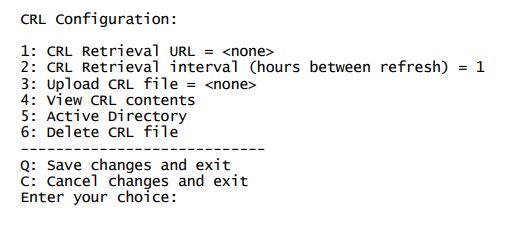
Select
2to configure the CRL retrieval interval.Select
Qto save your changes and exit the menu