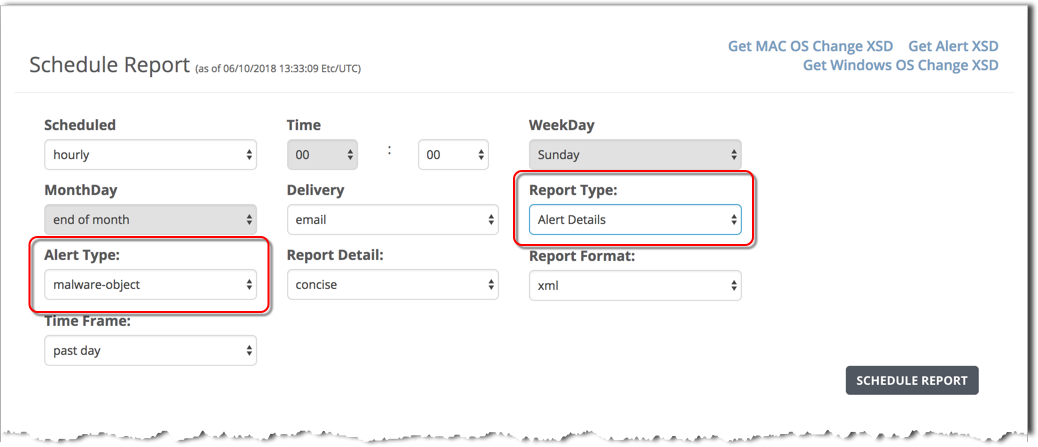
To schedule an alert details report using the Web UI, use the Schedule Report form and specify the Alert Details report type.
Prerequisites
The SMTP server or domain is configured and the email address of the report recipient is configured.
Admin or Operator access to the SmartVision appliance.
To schedule an alert details report:
Log in to the appliance Web UI and select Reports > Schedule Reports.
In the Scheduled field, set the report frequency:
hourly
daily
weekly
monthly
In the Time field, set the time of day in hours and minutes (00:00)
If you selected a weekly report, specify the report day of the week in the WeekDay field.
If you selected a monthly report, specify the report day of the month in the MonthDay field.
In the Report Type field, select Alert Details.
In the Alert Type field, specify the type of alert for the report:
all
domain-match
infection-match
malware-callback
malware-object
web-infection
Note
On a SmartVision Edition appliance, alert details reports can be generated for Malware Object alerts only.
In the Report Detail field, select the level of detail:
concise—Basic information, such as alert type, alert ID, source IP address, malware name, hostname, and alert URL.
normal—Concise information plus OS changes, callback details, and malware details, if available.
extended—Normal information plus data-theft information (if any) and static analysis details. This format provides all details about files and objects modified during analysis.
In the Report Format field, select the output format for the report:
xml
json
csv
text
In the Time Frame field, select the time period for this report:
past day
past week
past month
past 3 months
between start_date <yyyy>/<mm>/<dd> start_time <hh>:<mm>:<ss> end_date <yyyy>/<mm>/<dd> end_time <hh>:<mm>:<ss>
Click Schedule Report.
The report type and specifications are added to the top of the scheduled reports list.
After the scheduled report runs, the report file name is added to the top of the Generated Reports list and the report file is emailed using the configured email server and recipient list.
(Optional) Export the XSD files. These files describe the structure of the Alert Details report.
To export the Windows OS Change XSD, click the Get Windows OS Change XSD link at the top right side of the page.
To export the MAC OS Change XSD, click the Get MAC OS Change XSD link at the top right side of the page.
To export the Alert XSD, click the Get Alert XSD link at the top right side of the page.