The table transform allows you to return specific fields from queried events and then display those query results as a table. The event data displayed in the table are based on the fields specified as part of the table transform. This transform works in tandem with the other TQL transforms, sort and groupby.
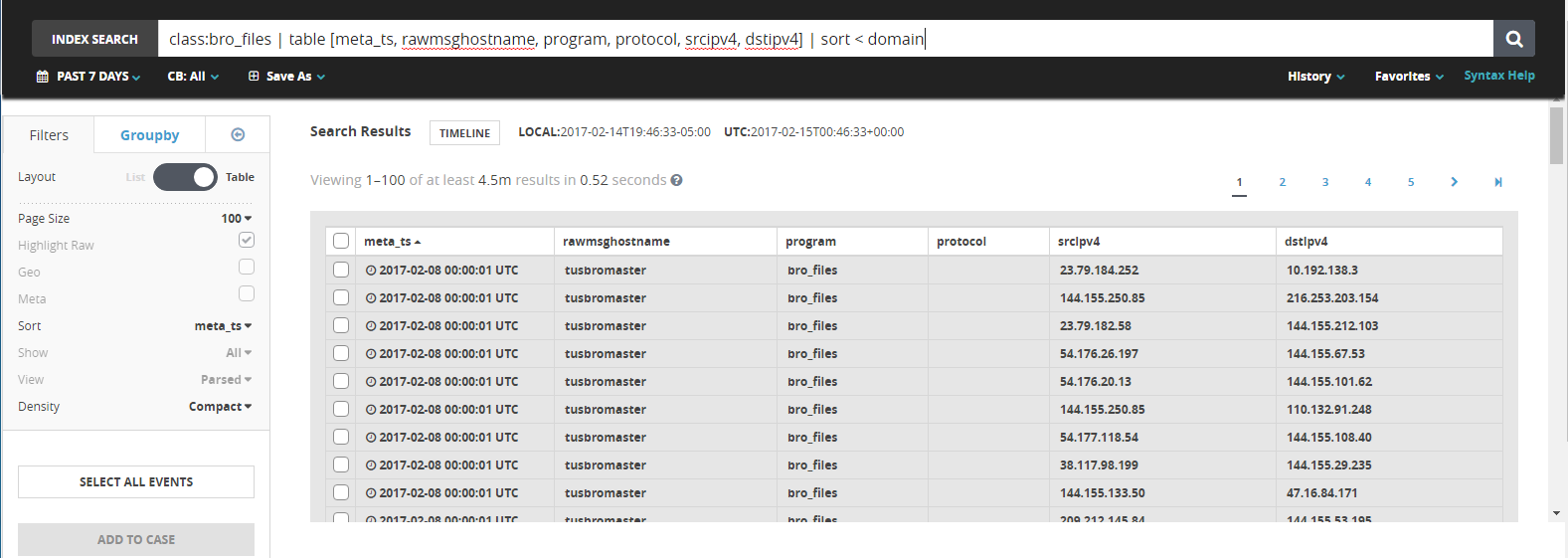
Table syntax
mql query | table [<field>,<field2>,<fieldn>]
Note
TQL was previously called MQL. You still use and see
mqlin TQL queries.
| The first column of the table. |
| The second column of the table. |
| The nth column of the table. |
Table functionality
The
tabletransform allows for an unlimited number of table columns. If your query creates more columns than can be displayed, you can see the other columns by scrolling to the right in the main Helix Enterprise window.You can modify how the table is sorted by clicking on any of the column headers or by modifying your TQL query.
As with other TQL queries, you can download all of your results as a CSV file.
Note
Unlike other TQL queries, you will not be able to select individual events or be able to add events to Incidents.
Tables and other transforms
You can add the sort or groupby transforms by using this query form:
mql query | table [<field1>,<field2>,<fieldn>] | sort [< or >] [<field>] | groupby [<field>]
Note
TQL was previously called MQL. You still use and see
mqlin TQL queries.
Example
class:bro_http method="GET" | table [metats,srcipv4,srcport,dstipv4, dstport,domain] | sort < domain
This query creates a table with HTTP GET requests from the Bro HTTP class, with columns for the metatas, srcipv4, srcport, dstipv4, dstport, and domain fields, while sorting the entire table in descending order from the domain column.