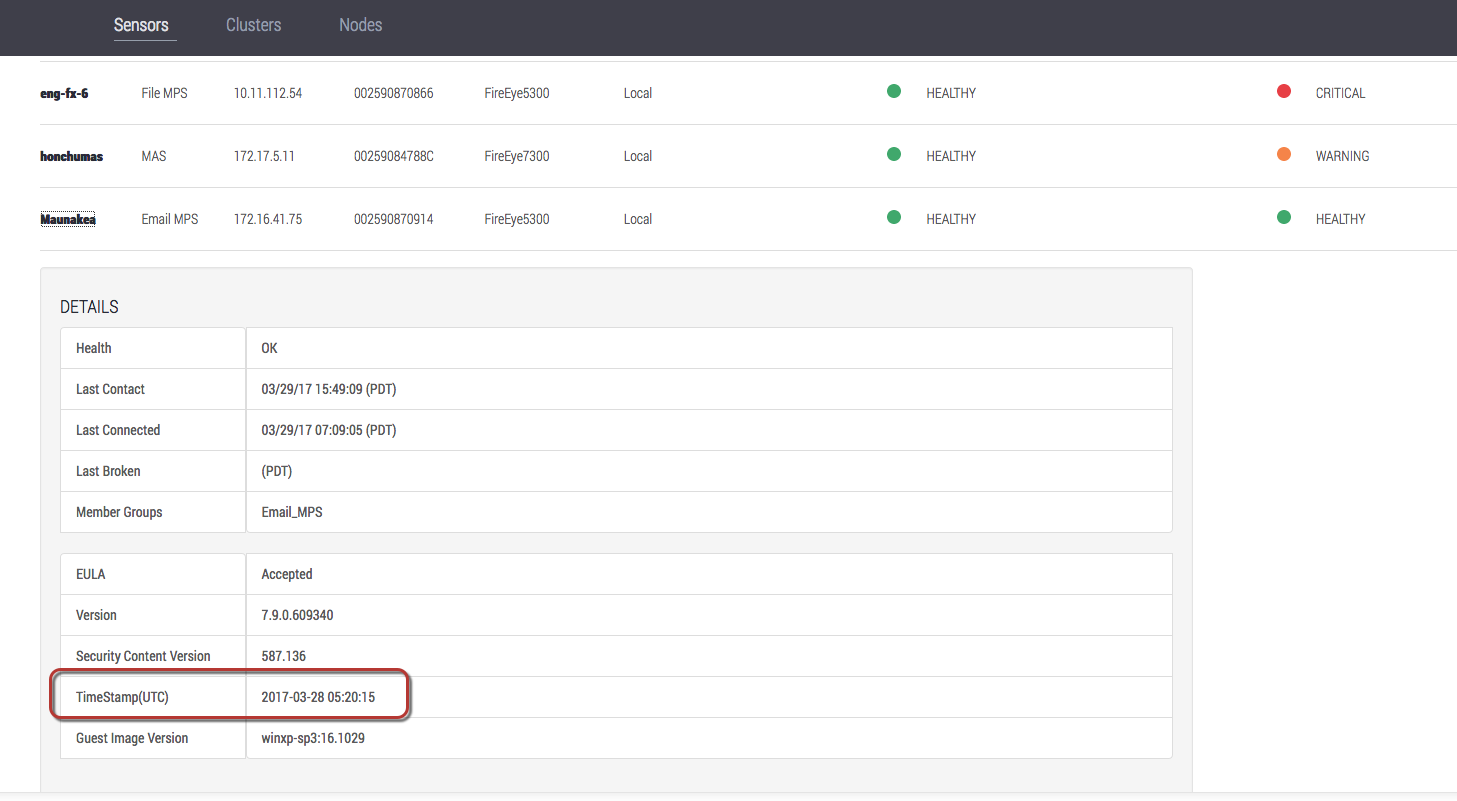
On managed appliances, the security content creation date is indicated by a timestamp embedded in the security content metadata. For Central Management System software release 8.0.0 and later, you can view the following information about the security content installed on managed appliances:
Security content versions can be viewed in the appliance Web UI and in the output of a CLI command.
Security content timestamps can be viewed in the appliance Web UI.
For information about warnings for outdated security content, see the managed appliance Administration Guide or System Administration Guide.
Log in to the Central Management System appliance CLI as an Admin, Operator, Monitor, or Analyst.
Go to enable mode.
hostname > enableDisplay the security content version numbers for managed appliances.
In the following example, the command output shows the security content version of each appliance managed by the Central Management System appliance:
hostname # show fenet security-content version Security Content Version: Installed Content Version for Managed Appliances: APPLIANCE VERSION EX-9 544.283 nx-1 544.283 nx-2 544.283 vx-1 527.045 vx-2 527.045
Log in to the Central Management System appliance Web UI as an Admin, Operator, Monitor, or Analyst.
Go to the Appliances > Sensors page.
Click the name of a managed appliance.
The security content timestamp is shown in the TimeStamp(UTC) field.