The Raw Disk script requests complete disk data from host endpoints and uses the disk‑acquisition audit to collect the contents of a disk drive from a host endpoint. This data acquisition is not for a single snapshot in time, but is an actual stream of the disk contents. As the acquisition progresses, changes may be made to the disk in locations that the script has yet to acquire. This script can be requested for Windows host endpoints only.
Note
Raw Disk script support is not provided for macOS or Linux host endpoints.
You cannot copy, edit, reset, import, or delete the Raw Disk script or use this script in data acquisition scripts you create. This script does not appear on the Data Acquisition Scripts page.
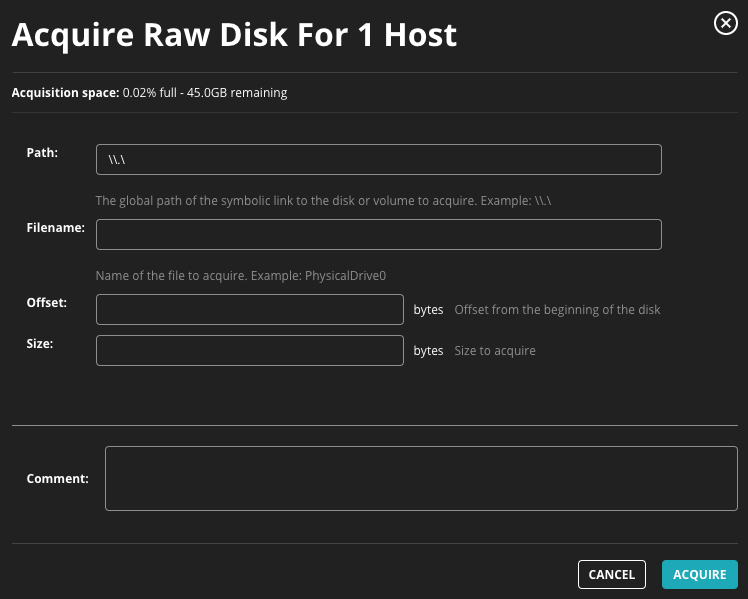
The following table describes the fields in this dialog box. A file name must be specified.
Field | Description |
|---|---|
Path | Specify the global path or the symbolic link to the disk or volume from which you want to acquire Raw disk data. |
Filename | (Required) Specify the name of the data acquisition file to acquire. |
Offset | Specify the offset, in bytes, from the beginning of the disk from which raw disk data should be acquired. |
Size | Specify the size, in bytes, of raw disk data to acquire. If you leave the Offset and Size values blank, you can acquire disk data for the entire disk. |
Comment | Enter details about your specific data acquisition request and enter the reason you want to acquire the file. |
| |
Requesting raw disk data
Caution
Raw disk data acquisitions can take a long time, return more information than expected, and cause performance and storage problems. Trellix recommends that you limit the scope of this script using the Acquire Raw Disk dialog box and that you request raw disk data acquisitions during off hours, when fewer system users may be affected.
Select Hosts in the Endpoint Security (HX) Web UI.
Select a host.
Note
If you select multiple hosts, the Raw Disk data acquisition option is not available. This script can only be requested when a single host is selected.
From the Actions menu, select Raw Disk and click Go. Alternatively, you can select Raw Disk from the Acquire menu on a host details page.
Click Go to access the Acquire Raw Disk dialog box.
In the Path field, enter the global path or the symbolic link to the disk or volume from which you want to acquire raw disk data.
In the Filename field, enter the name of the data acquisition file you wan to acquire.
In the Offset field, enter the disk offset (in bytes) from the beginning of the disk.
Note
If you select multiple hosts, the Raw Disk data acquisition option is not available. This script can only be requested when a single host is selected.
In the Size field, enter the size (in bytes) of the raw disk data you want to acquire.
In the Comment field, enter the reason you want to acquire the file and any details about the data acquisition request that you want to track.
Click Acquire.