You can tag a row of data in the Audit Viewer grid.
Review an acquisition in the Audit Viewer. See Viewing the acquisition data .
Make sure the data to which you want to add a tag is visible in the grid. See Selecting data to review .
Select a row in the Audit Viewer grid.
Click the open detail pane button (
 ) in the upper right corner of the Audit Viewer page.
Locate the Tag and Comment section at the bottom of the Details tab in the detail pane.
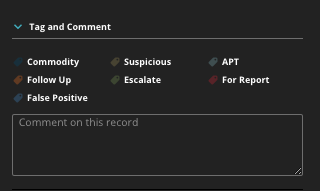
Click the tag you want for the row. Only one tag can be selected per row. The following tags are available:
Tag Name
Use
APT
Use this to tag a row as indicative of an advanced persistent threat (APT).
Commodity
Use this to tag a row as commodity malware. Commodity malware is typically normal malware, not exploits or APTs.
Escalate
Use this to tag a row as an escalation.
False Positive
Use this to tag a row as a false positive.
Follow Up
Use this to tag a row as something you need to follow up on.
For Report
Use this to tag a row for a report.
Suspicious
Use this to tag a row as suspicious.