A message transfer agent (MTA) receives incoming emails and forwards them to individual clients or users.
By default, anyone can connect and transmit emails to an Email Security - Server appliance. MTA access restriction lets you allow only certain devices to connect and transmit emails to the Email Security - Server appliance.
This feature provides a graceful method for controlling email traffic and it increases the security of your appliance. By default, there is no access restriction to the MTA interface.
Note
To perform maintenance activities, you can temporarily stop the SMTP interface, the MTA process, or both. For example, you can stop the SMTP interface and wait for queued emails to be processed before beginning an appliance upgrade. You can stop the MTA process to perform maintenance on the downstream mail server. For details, see the "Maintenance Support" section of the Email Security — Server System Administration Guide.
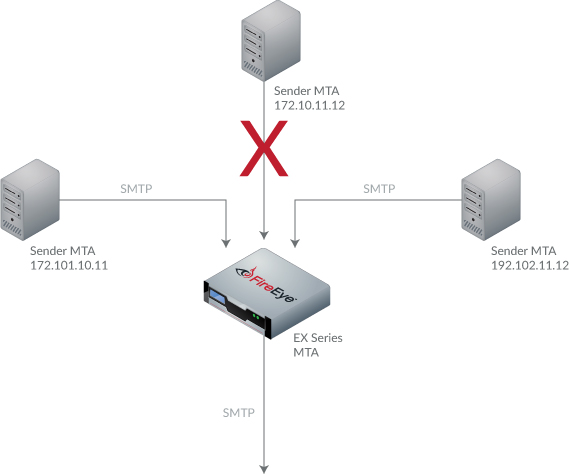
In the example, the devices 172.101.10.11 and 192.102.11.12 can connect and transmit emails to the Email Security - Server MTA because they are in the MTA access restriction list. The device 172.10.11.12 cannot connect and transmit emails to the Email Security - Server MTA because it is not in the MTA access restriction list.
The IP address of the allowed devices can be specified as either a single IP address or list of IP addresses, or as a subnet using Classless Inter-Domain Routing (CIDR) notation. You can specify up to 10 addresses in the list.
Without MTA access restriction, firewall rules must be specified to restrict access to your MTA.