Web user list definitions are used to define web protection rules. They are added to rules and classifications as Web User List classification criteria.
Perform these steps to create a web user list definition:
In ePO - SaaS , select Menu → Data Protection → DLP Policy Manager → Definitions.
In the left pane, under Soure / Destination select Web User List, then select Actions → New Item.
In the Web User List pane, click Actions → New Item to create a new web user list. You can click Edit to modify an existing web user list.
The New Web User List page opens.
Enter a unique Name and an optional Description.
Add the required details such as web user list name, description, and values based on the type of the operator.
Operator can be of the type sAMAccountName, UserPrincipalName, or Domain/sAMAccountName. For more information about operator validations, see Operator validations.
Note
Use "/" (forward slash) when you specify Domain/sAMAccountName as this is the supported format.
Optionally, you can click Import Entries to import a web users list saved on your system in the .csv file format. The csv file must have OPERATOR and VALUE as headers. You can use the following format in a .csv file when importing a web user list:
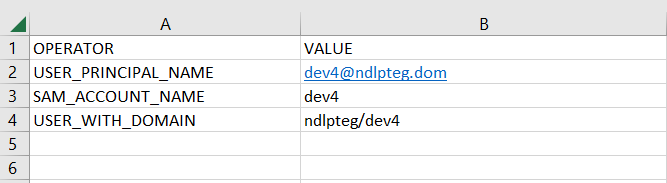
Click Export Entries to export a web user list to save the entries on your system.
Click Save.
Use this web user list in a web protection rule. For more information, see Add a web user list to a web protection rule.