You can deploy a Trellix DLP Network Monitor cluster or a Trellix DLP Network Prevent cluster or both clusters based on your environment.
Deploy a Trellix DLP Network Prevent cluster to load balance the incoming email and web traffic, and accomplish high availability if a cluster node fails. In this scenario, a single deployment of Trellix DLP Network Prevent cluster analyzes and load balances the email and web traffic.
Caution
The cluster ID and the virtual IP address must be different from that of a Trellix DLP Network Prevent cluster ID and virtual IP address, regardless of the management platform. You must not share the cluster scanners between two clusters.
A Trellix DLP Network Monitor cluster has the following requirements:
A dedicated Trellix DLP Network Monitor packet acquisition device (PAD).
Two or more dedicated Trellix DLP Network Monitor scanners.
A Trellix DLP Network Prevent cluster has the following requirements:
A Trellix DLP Network Prevent primary node (the primary appliance). The primary appliance is responsible for distributing email and web traffic for analysis between itself and the cluster scanners. If the primary appliance fails, any of the cluster scanners take over the primary role.
One or more Trellix DLP Network Prevent scanners.
Trellix DLP Network appliance cluster setup
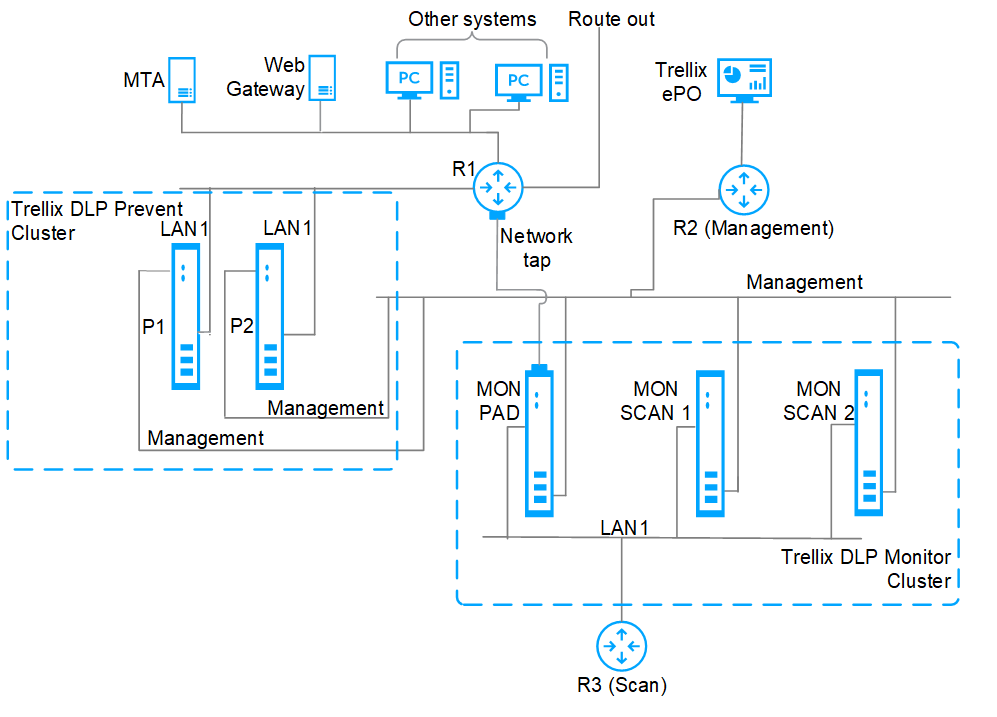
Three networks are connected to three routers:
R1 is connected to general network traffic.
R2 is connected to a management network with the ePO - On-prem server connected to it. All Trellix DLP Network Monitor and Trellix DLP Network Prevent systems have their management interfaces connected to R2.
R3 is connected to a private scanning network of the Trellix DLP Network Monitor cluster. All Trellix DLP Network Monitor systems have their LAN 1 interfaces connected to R3.
MTA is the mail server for the R1 network, while Skyhigh® Security Secure Web Gateway (SWG) is used as the web proxy. Other systems are also connected to this network and R1 is the route out.
P1 and P2 are two Trellix DLP Network Prevent servers in a cluster. Their LAN 1 interfaces are connected to R1. They receive email traffic from MTA and web traffic from the web gateway (SWG). The responses go back to MTA and SWG, while the events are sent to the ePO - On-prem server.
A network tap mirrors all network traffic going through R1 to the capture interface on the packet acquisition device, MON PAD. The appliances, MON SCAN 1 and MON SCAN 2 are dedicated load balancing scanners and receive scanning requests from MON PAD. The scan results are sent to ePO - On-prem for monitoring and tracking the incidents.