Deploy a Trellix DLP Network Monitor cluster when the network traffic monitoring and scanning capacity you want exceeds that of a standalone Trellix DLP Network Monitor appliance.
A cluster of Trellix DLP Network Monitor appliances consists of a packet acquisition device (PAD) and two or more dedicated scanning appliances. You can configure the cluster role from the Setup Wizard during the installation of an appliance.
Note
Once the cluster role is applied to an appliance, the system reboots automatically. Later, to change the cluster role, you must reset the appliance to factory defaults and apply the cluster role you want.
All nodes in a cluster must be connected to the same physical network. One of the scanning nodes listens on the configured virtual IP address for the incoming scanning requests and distributes them to the remaining cluster members.
The scanning appliances support failover, that is, if the appliance listening on the virtual IP address fails, another scanner member takes over its responsibilities.
To manage the appliances, provide the cluster ID and virtual IP address from the ePO - On-prem console.
Caution
You can't share cluster scanner nodes between a Trellix DLP Network Prevent cluster and a Trellix DLP Network Monitor cluster. The cluster ID and virtual IP address must be unique and different from that of the Trellix DLP Network Prevent cluster ID and virtual IP address.
Complete the installation of all appliances, which you plan to include in a cluster in your network.
Note
For performance optimization, make sure that all appliances in a cluster configuration are of the same model, and all virtual appliances have the same specifications.
For the appliance to be managed, register the appliance with ePO - On-prem from the Setup Wizard.
Enable load balancing from ePO - On-prem.
Connect the Trellix DLP Network Monitor appliance to your network, for example, a SPAN port or a network tap.
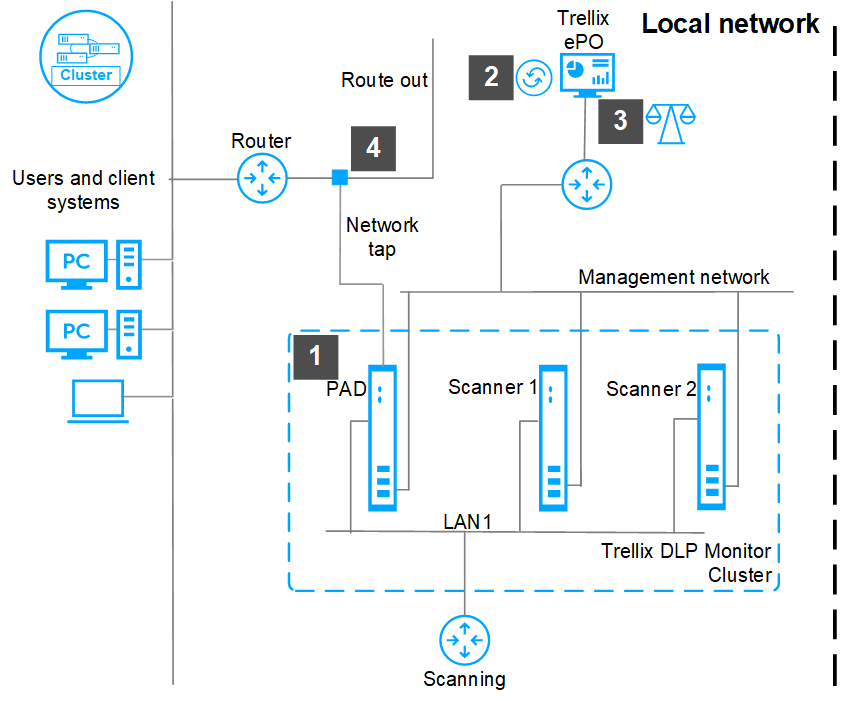
Best practices for setting up a Trellix DLP Network Monitor cluster
Use these guidelines when setting up a Trellix DLP Network Monitor cluster.
Run Trellix DLP Network Monitor appliances as part of a cluster to load balance the analysis of network traffic.
Deploy two or more scanners to achieve maximum scanning capacity.
Connect all scanners to a private scanning network and not to a public network.