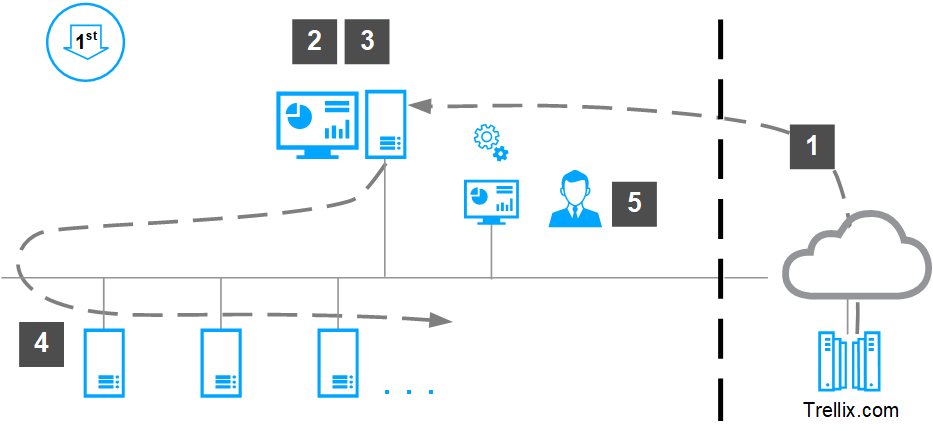
Before you can install Trellix Data Loss Prevention Discover for the first time, you must install and set up in the required configuration, and deploy Trellix Agent to the network endpoints.
Download the software from the Trellix DLP download site, or use the ePO - On-prem Software Manager (Software Catalog in ePO - On-prem 5.10) to view, download, and install the software.
Install the Trellix DLP extension in the ePO - On-prem Extensions folder.
Check in the Trellix Data Loss Prevention Discover server package to the ePO - On-prem Main Repository.
Note
If you are using the Registered Documents feature, check in the DLP Server package as well.If you are using the OCR feature, check in the OCR package. See Trellix DLP Discover options for more information.
Deploy Trellix Agent to the Trellix Data Loss Prevention Discover servers.
Deploy the Trellix Data Loss Prevention Discover server software to the servers from the ePO - On-prem System Tree.
Verify the installation in the DLP Operations console .
Note
DLP Operations is a feature of the Trellix DLP extension in ePO - On-prem. You must install at least one license on the DLP Settings page to use any of the Trellix DLP features.